
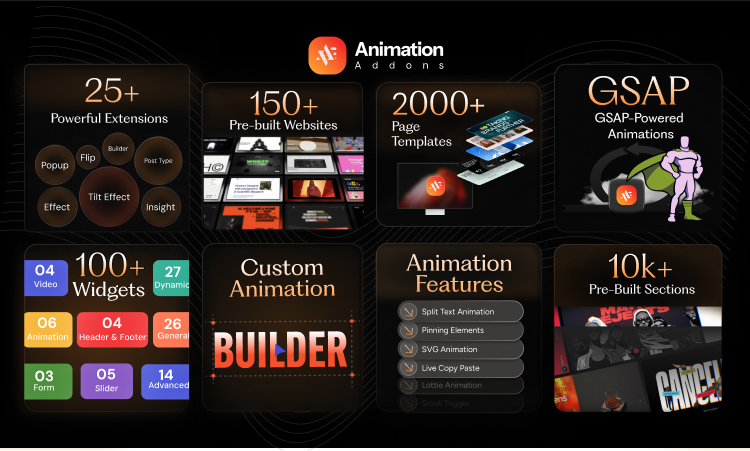
Animation does more than just look good. It guides users, shows feedback, and adds emotion. Whether you are building a landing page or a product section, small movements help people focus. Elementor comes with basic motion effects. However, Animation Addons gives full control over scroll and GSAP animations.. No coding needed. Just creative control and powerful results.
This guide breaks down how it works and why it matters.
Key Takeaways
- Animation Addons is a no-code animation plugin for Elementor.
- GSAP-powered animation plugin.
- Offers 100+ Elementor animation widgets and 25+ extensions for scroll, hover, and more.
- Designed for performance, speed, and mobile responsiveness.
- Ideal for designers, developers, and agencies using WordPress.
What is Animation Addons?
Animation Addons is a WordPress plugin that helps you add smooth animations to your site. With this plugin, you can create an animation that triggers on scroll, hover, or follows a custom timeline. You don’t need to write any code. Most animation plugins only work with certain page builders. However, Animation Addons is different. It’s built for Elementor, but it works with any WordPress theme or layout. This gives you complete design freedom.
On top of that, you can animate headings, icons, sections, or even a full page layout. The plugin includes a drag-and-drop builder with detailed control. Plus, you can easily adjust speed, delay, and effects to get the perfect look. Overall, this plugin makes adding cool effects easy and flexible.
Key Features of Animation Addons (with Detailed Use Cases)
Animation Addons gives you many tools to add motion to your website. You don’t need any extra plugins or coding skills. Everything works inside your WordPress builder. You can create scroll-based animations, cursor effects, text animations, and more. Each feature is designed to help you build modern and interactive pages.
Below, you will explore the top features.
1. GSAP-Based Core
Animation Addons uses animation logic based on GSAP (Greenshok Animation Platform). GSAP is one of the most trusted libraries in web development. Plus, GSAP is trusted by major brands like Google and Adobe to power smooth, high-performance web animations.
Here’s why it matters:
- Fast and Smooth: Animation looks good and runs well on all devices.
- Flexible Controls: You can animate, size, position, rotation, opacity, and more.
- Browser Friendly: Works across all major browsers without any issue.
2. ScrollTrigger Animation Builder
ScrollTrigger lets you animate elements when users scroll down the page. This feature is very popular in modern web design.
With Animation Addons, you can:
- Make content appear when it enters the screen.
- Pin sections to stay fixed during scroll.
- Add motion based on scroll speed or position.
- Sync multiple animations to the same scroll action.
Use case: On a SaaS landing page, reveal features one by one as users scroll. End the section with a pinned pricing table that fades in. This keeps users focused and improves conversions.
3. Cursor Effect and Mouse Movement Interaction
Custom cursors add a fun and interactive feel to your site. Animation Addons gives you tools to customize how the cursor behaves.
You can:
- Choose different cursor styles like dot, halo, or magnetic effects.
- Make the cursor follow movement in smooth ways.
- Trigger animations when hovering over buttons or images.
These effects are great for creative websites or agencies that want to impress visitors. It adds a modern, playful touch to the user experience.
4. Split Text and Animate Words or Letters
Text animation helps your message stand out. Animation Addons allows you to break text into small parts and animate them.
You can:
- Split text into characters, words, or lines.
- Animate each part with effects like fade, scale, rotate, and more.
- Control timing, delay, and animation order.
Real-world use : In a homepage hero section, animate each letter of a headline as the page loads. Then, bring in a call-to-action button with a bounce or zoom effect. This grabs attention right away.
5. Draggable Elements and Interactive Blocks
Want to make your site more interactive? You can let users drag elements on the page, without writing JavaScript.
Here’s what you can build:
- Drag-and-drop image sliders.
- Product configurators.
- Drag-to-reveal sections or quizzes.
- Touch-friendly elements for mobile users.
You can even add bounce or elastic easing to make the interaction feel natural and smooth.
6. Smooth Scrolling and Parallax Effect
Enable smooth scroll across your entire site or in specific sections. You can also create:
- Vertical or horizontal parallax movement.
- Layered animations that reveal depth.
- Sticky sections with synchronized animations.
Use Case: Perfect for immersive product pages or long-form content..
7. Sticky and Pining Behavior
Pinning content during scroll can help highlight important parts of your page. With Animation Addons, you can stick elements in place and animate them while the user scrolls.
This is great for:
- Step-by-step tutorials
- Visual storytelling
- Product showcases with synchronized text and images
Design idea: Pin a section where images slide in from left and right as the user scrolls, with synced captions fading in.
Comparing Animation Addons with Elementor Motion Effect
See the full comparison between Animation Addons and Elementor Motion Effects.
| Features | Animatin Addons | Elementor Motion Effect |
| Scroll Animation | ✅Advanced GSAP | ✅Basic (CSS transform) |
| Timeline Control | ✅ Built-in Timelines | ❌ NO Timeline |
| Trigger Options | ✅ Scroll, hover, loop | ⚠️Very Limited |
| Custom Ease/ Delay | ✅Full Control | ⚠️ Minimal Option |
| Device Breakpoints | ✅ Enable/ Disable by device | ✅Basic Support |
| Performence | ✅GSAP optimized | ⚠️ Ok, not smooth |
| Coding Needed | None | None |
| Multiple Effects on one Element | ✅Layer, Stagger, and combine animations | ❌ One animation at a time |
| Responsive Behavior (per breakpoint) | ✅ Set different effects for mobile, tablet, and desktop | ❌ Same animation across all devices |
Real Benefits of Using Animation Addons
Animations have really become part of what makes a website feel alive and interesting. They help visitors know where to look and what’s important.
Here’s why Animation Addons is useful:
- Improve User Experience: If you click or hover on buttons, animations make it feel smooth and responsive.
- Responsive Interaction: Buttons and links react naturally, making the site more enjoyable to use.
- Guide Attention: Animations show you what to focus on as you scroll down the page.
- Increase Engagement: Moving parts catch your eye and make you want to explore more.
- Boost Conversions: Animated buttons and pricing info can help get more people to take action.
- Polished Design: Small animations make your site look professional and stand out from others.
- Easy to Use: You don’t need to know any code — the plugin makes adding animations simple.
More websites use animations now. This plugin helps you do the same without slowing your site or making things complicated.
Pros and Cons
Pros
- Built with GSAP, it creates smooth and professional animations.
- Offers lots of options for triggers and easing effects.
- Works seamlessly inside Elementor, no coding needed.
- Lightweight and quick to load.
- Doesn’t require any extra plugins.
Cons
- It’s a freemium plugin.
- Could be too much for users who want something simple.
- Managing many animations at once can get complicated.
Conclusion
Animation Addons makes it easy to add cool animations to your WordPress site. You don’t need to know any code. It works great with Elementor and helps your site look fresh and feel smooth. Whether you’re a designer or developer, this plugin lets you create eye-catching effects that run well on any device. If you want your website to stand out, Animation Addons is a smart pick.
Frequently Asked Questions (FAQ)
1. Do I need to know how to code to use Animation Addons?
Nope! You don’t have to know any coding. The plugin lets you add animations using simple controls and settings. Whether you use Elementor or another theme, it’s all pretty easy.
2. Does Animation Addons only work with Elementor?
It works best with Elementor, but you can use a lot of its features with other themes or layouts too. You just apply animations using classes or IDs.
3. Will these animations make my site slow?
Not at all. Animation Addons is built to be lightweight and fast. It only loads what it needs and uses smart animation methods that won’t slow your site down.
4. What kind of animations can I make?
Lots of different ones! Scroll animations, hover effects, text animations, draggable stuff, cool cursor effects, smooth scrolling, and more. You can control how fast they run, how they move, and when they start.