
Introduction
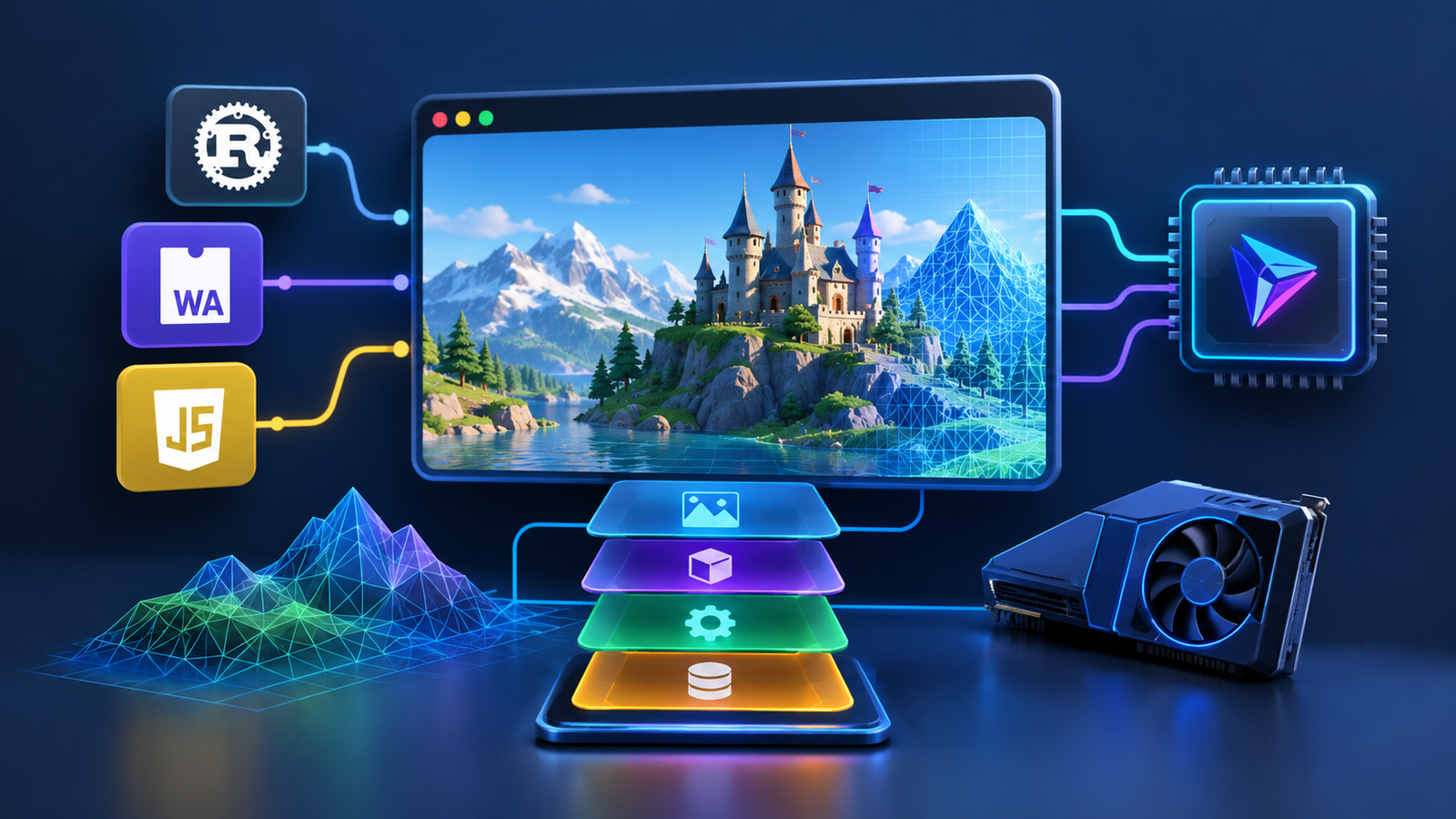
WebGPU Development is changing how developers approach browser-native 3D applications. Instead of relying exclusively on traditional browser graphics techniques, developers can use WebGPU for modern GPU rendering and computation, Rust for performance-sensitive systems, and WebAssembly for running compiled code directly in the browser.
This combination creates new possibilities for interactive games, 3D product configurators, simulations, architectural visualization, and engineering applications. A WAMR3D-style architecture illustrates this direction: a browser-based runtime that combines compiled engine components with a modern graphics backend.
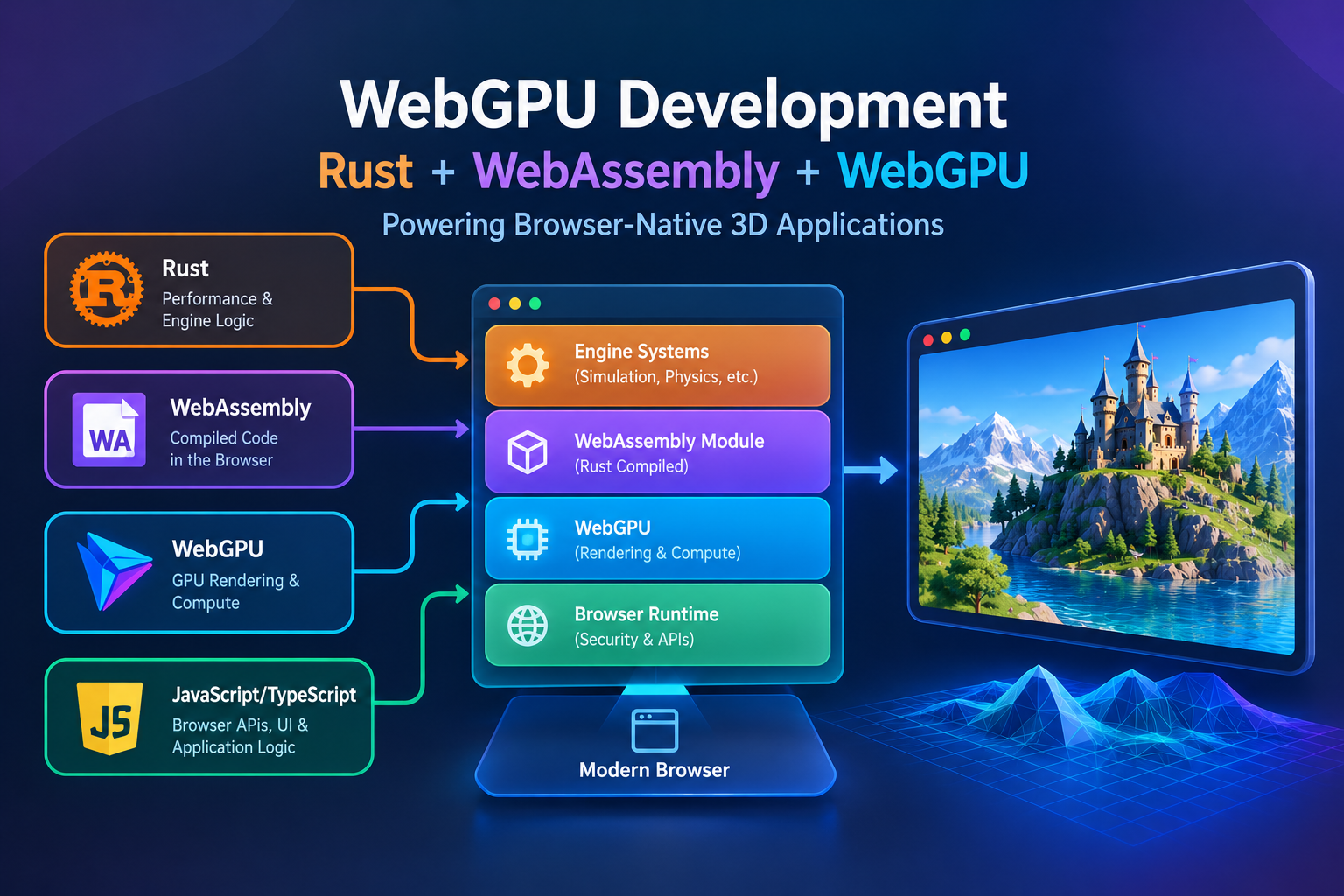
However, these technologies serve different purposes. WebGPU manages GPU operations, WebAssembly provides a portable execution format, and Rust is a programming language that can compile to WebAssembly. JavaScript or TypeScript typically connects these components to browser APIs and application logic.
The challenge is not simply combining three technologies. Developers must design an efficient architecture, manage memory, handle browser compatibility, and measure performance across real devices.
This guide explores how WebGPU Development works, where Rust and WebAssembly fit, how WebGPU compares with WebGL and Vulkan, and when Three.js or Babylon.js may be a better starting point than building a custom 3D engine.
Developers can explore this architecture further in our guide to WebGPU WebAssembly, which explains how these technologies support browser-based game development.
Understanding WebGPU Development and Browser-Native 3D
What Is WebGPU Development?
WebGPU Development is the process of creating browser applications that use the WebGPU API for GPU-based rendering and computation. It gives developers a modern programming model for working with graphics hardware through compatible browsers.
Unlike a complete game engine, WebGPU is an API rather than a ready-made collection of scene management, physics, asset loading, animation, and gameplay systems. Developers must build these components themselves or use an existing framework.
The official W3C WebGPU specification defines the API’s core programming model and capabilities.
For a broader introduction to compiled browser code, read What Is WebAssembly? How It Is Changing Web Development
How Browser-Native 3D Engines Work
A browser-native 3D engine runs within the browser’s security and execution environment. It can display interactive environments without requiring users to install a separate native application.
A typical engine includes:
- A rendering system for geometry, lighting, materials, and cameras.
- A scene system for organizing objects and transformations.
- An asset pipeline for loading models, textures, and animations.
- A simulation layer for physics and other calculations.
- An application layer for input, networking, and interaction.
- A resource manager for GPU buffers, textures, and memory.
WebGPU Development can strengthen the rendering layer, but the overall quality of the engine still depends on the design of these supporting systems.
Key Benefits of WebGPU for 3D Applications
WebGPU supports programmable rendering pipelines and compute workloads. These capabilities can help developers build:
- Browser-based 3D games.
- Interactive product visualization tools.
- Scientific and engineering simulations.
- Digital twins and architectural walkthroughs.
- GPU-accelerated particle systems.
- Complex data visualization applications.
The main advantage is architectural flexibility. Developers can keep browser interaction, simulation, and graphics in separate modules while choosing suitable implementations for each workload.
Understanding WAMR3D-Style Architecture
A WAMR3D-style approach can be understood as a browser-native runtime that combines compiled engine systems with GPU rendering. The specific design depends on the project; the term should not be treated as a guarantee of any particular engine feature or benchmark.
For example, a simulation could run selected calculations in a Rust-based WebAssembly module while WebGPU renders the resulting environment. JavaScript or TypeScript would coordinate the application and manage browser interactions.
This separation makes WebGPU Development a practical option for projects that need more control than a simple 3D scene library provides.
Combining Rust, WebAssembly, and WebGPU
Why Rust Is Useful for 3D Engine Development
Rust provides strong type checking, memory-safety features, and control over data structures. These characteristics make it useful for performance-sensitive engine systems.
Potential applications include:
- Physics calculations and collision detection.
- Spatial indexing and scene queries.
- Procedural geometry generation.
- Numerical simulation.
- Animation mathematics.
- Data processing and asset transformation.
Rust is not mandatory for every engine component. JavaScript and TypeScript remain practical for browser APIs, user interfaces, and application orchestration.
How WebAssembly Executes Compiled Code
WebAssembly, commonly called Wasm, is a portable binary instruction format that browsers can execute in a sandboxed environment. Developers can compile suitable Rust, C++, and other language code to Wasm.
The MDN WebAssembly documentation explains how WebAssembly works alongside JavaScript.
For a 3D engine, a Wasm module might handle collision checks for many objects or process numerical data used by a simulation. JavaScript can then pass the necessary results to the rendering system.
WebAssembly does not automatically make every workload faster. Module initialization, memory use, data conversion, and communication between JavaScript and Wasm all affect performance.
The Role of WebGPU in GPU Rendering
WebGPU handles GPU resources, rendering pipelines, and compute operations. It is suitable for workloads such as geometry rendering, lighting, particle processing, and selected parallel calculations.
The technologies can be divided as follows:
| Technology | Primary responsibility |
| Rust | Engine algorithms and CPU-intensive systems |
| WebAssembly | Executing compiled engine modules |
| WebGPU | GPU rendering and compute |
| JavaScript/TypeScript | Browser APIs, input, UI, and coordination |
| HTML/CSS | The surrounding application interface |
These boundaries are flexible. Some projects may use JavaScript for physics or perform certain computations entirely on the GPU.
For more practical guidance, read Eduonix’s guide to WebAssembly in modern web applications. It explains when compiled modules can help and why developers should profile their applications before moving workloads into Wasm.
How the Technologies Work Together
Consider a browser-based simulation. JavaScript collects user input, Rust-based logic updates the simulation through WebAssembly, and WebGPU renders the scene.
This division can reduce unnecessary coupling between components. It also makes it easier to replace one system without rewriting the entire application.
Successful WebGPU Development depends on selecting the right boundaries and minimizing unnecessary data transfers between CPU and GPU memory.

Choosing Between WebGPU, WebGL, and Vulkan
WebGPU vs. WebGL
WebGL is a browser graphics API based on OpenGL ES concepts. It remains useful for established applications and projects that need a broad browser graphics ecosystem.
WebGPU offers a modern programming model, explicit resource management, and compute pipelines.
| Feature | WebGPU | WebGL |
| Primary purpose | Graphics and GPU computation | Browser graphics |
| Compute shaders | Supported | No equivalent native compute pipeline |
| Resource management | Modern, explicit model | Traditional graphics-oriented model |
| Ecosystem | Evolving | Mature |
| Compatibility | Depends on browser and hardware | Broadly established browser support |
Neither API is automatically faster for every application. Results depend on the hardware, browser, graphics driver, workload, and engine implementation.
The MDN WebGPU API reference provides information about browser support and API usage.
WebGPU Development should therefore include capability checks and a fallback strategy when a project targets a diverse audience.
Understanding Vulkan in Graphics Development
Vulkan is a native graphics and compute API that gives developers explicit control over GPU resources and command submission.
It is relevant to native game engines, desktop applications, and platform-specific rendering backends. However, browser applications generally use WebGPU rather than calling Vulkan directly.
A browser’s WebGPU implementation may translate API operations to an underlying native graphics API. Developers should not assume that every browser uses the same backend.
A cross-platform engine could use Vulkan for its native edition and a separate WebGPU backend for its browser edition.
When Should You Use WebGPU Instead of WebGL?
WebGPU is worth evaluating when a project needs modern rendering pipelines, compute shaders, or greater control over GPU resource management.
WebGL may remain preferable when an existing engine already meets performance requirements or compatibility is the primary concern.
For games, a sensible approach is to establish the minimum visual and functional requirements first, then benchmark the available rendering paths.
Planning a WebGL Fallback
A fallback does not need to reproduce every WebGPU effect. It should preserve the essential experience.
For example, the WebGPU renderer might support advanced particle simulation, while the WebGL renderer uses a simpler effect. Both can share scene data, camera controls, and gameplay logic.
This approach allows WebGPU Development to serve modern devices without excluding users whose browsers lack the required capabilities.
Building a Browser-Native 3D Engine Architecture
Designing the Core Engine Components
A maintainable browser-native engine should separate application logic, simulation, rendering, and asset management. This allows developers to improve individual components without changing the entire runtime.
A practical architecture includes:
- Application layer: Manages input, browser events, UI, and application state.
- Scene system: Organizes objects, cameras, transformations, and scene relationships.
- Simulation layer: Handles physics, animation, and other update systems.
- Rendering layer: Manages WebGPU resources, pipelines, materials, and draw commands.
- Asset system: Loads, validates, caches, and releases resources.
- Platform layer: Handles browser capabilities, resizing, and lifecycle events.
These components should communicate through defined interfaces rather than depending on one another’s internal implementation.
Connecting Rust and WebAssembly to the Rendering Layer
Keep Rust-based modules focused on suitable CPU workloads. The rendering system should receive the data it needs without depending on how the simulation calculates it.
For example, a physics module can update object positions in WebAssembly. The application layer can then make those positions available to the renderer.
Typed arrays can help represent large collections of numerical values efficiently. Batch operations also reduce the overhead of repeatedly crossing the JavaScript–WebAssembly boundary.
Web Workers may be useful for independent background calculations, although they introduce additional communication and synchronization considerations.
Initializing WebGPU in a Browser
The following example illustrates the basic WebGPU initialization process. It checks for browser support, requests a GPU adapter, and creates a device.
async function initializeWebGPU() {
  try {
    if (!("gpu" in navigator)) {
      console.error("WebGPU is not supported in this browser.");
      return;
    }

    const adapter = await navigator.gpu.requestAdapter();

    if (!adapter) {
      console.error("No compatible GPU adapter found.");
      return;
    }

    const device = await adapter.requestDevice();

    console.log("WebGPU initialized successfully!");
    console.log("GPU Adapter:", adapter);
    console.log("GPU Device:", device);

    return { adapter, device };

  } catch (error) {
    console.error("WebGPU initialization failed:", error);
  }
}

initializeWebGPU();
This initializes a GPU device but does not draw a scene. A complete renderer must also configure a canvas context, create rendering pipelines and buffers, manage textures, and handle device-loss events.
For production applications, request only the GPU features and resource limits the engine actually needs.
Building a Modular and Maintainable Engine
Start with a simple scene containing a camera, a basic object, and a working renderer. Add resource management, input handling, and simulation incrementally.
A sensible development sequence is:
- Render a basic 3D object.
- Add camera controls and user input.
- Introduce scene management and asset loading.
- Add physics or other simulation systems.
- Move CPU bottlenecks into WebAssembly where justified.
- Introduce advanced WebGPU rendering and compute features.
- Test browser compatibility and performance.
This incremental approach makes debugging easier and helps prevent unnecessary complexity.
Three.js vs. Babylon.js: Choosing a 3D Framework
What Is Three.js?
Three.js is a JavaScript 3D library that provides tools for scenes, cameras, geometry, lighting, materials, and animation.
It is useful for interactive websites, product visualization, custom 3D viewers, and experimental graphics applications.
Three.js also offers a WebGPU renderer. Developers can explore its capabilities through the official WebGPU renderer documentation.
Three.js is a practical starting point when a project needs flexible 3D functionality without requiring developers to implement an entire engine from scratch.
What Is Babylon.js?
Babylon.js is a 3D engine framework with a broader collection of tools for interactive applications and games.
Its ecosystem includes rendering features, scene utilities, asset loaders, materials, and development tools. It can be suitable for teams that prefer a more integrated environment for building browser-based 3D experiences.
As with Three.js, developers should check the current documentation to confirm support for the specific WebGPU features their application requires.
Three.js vs. Babylon.js: Key Differences
| Consideration | Three.js | Babylon.js |
| Main approach | Flexible 3D library | Integrated 3D engine framework |
| Custom architecture | Well suited | Also possible |
| Typical applications | Custom viewers and interactive websites | Feature-rich 3D applications and games |
| Development approach | Assemble the systems you need | Use a broader engine ecosystem |
| WebGPU | WebGPU renderer available | WebGPU support within its engine ecosystem |
Neither framework is universally better. The choice depends on project requirements, team experience, tooling preferences, and required features.
When Should You Build a Custom 3D Engine?
A custom Rust and WebAssembly engine may make sense when you need specialized simulation, a custom memory model, a unique asset pipeline, or precise control over the runtime.
However, custom development also means maintaining rendering infrastructure, debugging tools, asset compatibility, and browser-specific behavior.
Before committing to a custom engine, prototype the most demanding features. If an existing framework meets your performance and functionality requirements, using it may save substantial engineering time.
Optimizing Rendering, Memory, and Asset Loading
Improving Rendering Performance with WebGPU
A powerful rendering API cannot compensate for inefficient scene design. WebGPU Development should include performance optimization from the earliest prototypes.
Useful techniques include:
- Frustum culling: Avoid rendering objects outside the camera’s view.
- Level of detail: Use simpler models for distant objects.
- Instancing: Render repeated objects efficiently when they share compatible resources.
- Texture optimization: Reduce unnecessary texture dimensions and memory use.
- Pipeline management: Reuse compatible rendering resources where practical.
- Resolution scaling: Adjust rendering resolution for constrained hardware.
The best techniques depend on the scene. Measure their effects instead of assuming every optimization will help.
Using Compute Shaders for GPU Workloads
WebGPU compute shaders can process large collections of parallel operations. Potential applications include particle simulation, procedural calculations, visibility processing, and selected animation workloads.
However, GPU execution is not automatically faster than CPU execution. Small tasks may be cheaper to perform on the CPU, while transferring results back from the GPU can introduce synchronization costs.
Keep intermediate data on the GPU when possible, and avoid unnecessary CPU-to-GPU transfers.
Managing WebAssembly Memory Efficiently
A WebAssembly module consumes memory and requires an appropriate data layout. Large collections of numerical values are often better represented using predictable structures and typed arrays than repeatedly converted JavaScript objects.
Developers should also consider module size, initialization time, and memory growth. A faster simulation may not justify a significant increase in download time for a small browser application.
The Eduonix WebAssembly performance guide offers further guidance on minimizing boundary crossings, using typed arrays, and measuring the benefits of compiled code.
Optimizing 3D Assets and Loading Times
A production asset pipeline should:
- Validate models and textures before release.
- Compress assets where supported.
- Load essential resources first.
- Stream optional content when appropriate.
- Cache reusable resources.
- Release GPU resources that are no longer needed.
Large environments should not necessarily require every model and texture to be loaded before users can interact with the application.
Progressive loading can improve responsiveness, provided the engine handles missing or delayed resources gracefully.
Measuring Frame Rates and Rendering Performance
At 60 frames per second, a frame has approximately 16.67 milliseconds available. JavaScript, WebAssembly, GPU submission, rendering, and other work must fit within the application’s performance target.
Measure frame-time variation, loading delays, memory usage, and performance on lower-powered devices.
Average frame rate alone is not sufficient. An application that averages 60 FPS but regularly experiences long frame delays may still feel slow.
Testing, Compatibility, and Production Deployment
Checking Browser and GPU Compatibility
WebGPU support varies by browser, operating system, and hardware. Check whether the API is available, request a compatible adapter, and handle device-creation failures.
API availability alone does not guarantee that every optional feature will be supported.
When broad compatibility matters, consider a WebGL fallback if the chosen engine supports it. Provide a clear message if neither rendering path is available.
Testing Performance Across Different Devices
Test representative desktop and mobile devices rather than relying exclusively on a high-powered development machine.
Evaluate:
- Time to the first rendered frame.
- Rendering stability during complex scenes.
- Memory consumption during extended sessions.
- Input responsiveness.
- Asset loading under slow network conditions.
- Behavior when GPU resources are lost.
- Performance across supported rendering paths.
For games, test real gameplay rather than only a static benchmark scene.
Deploying WebAssembly and WebGPU Applications
WebGPU requires a secure context in supported browser implementations, so production websites should use HTTPS.
Additional deployment practices include:
- Compressing JavaScript and WebAssembly assets.
- Caching versioned resources appropriately.
- Serving WebAssembly with the correct MIME type.
- Avoiding expensive initialization on the main thread.
- Providing useful loading indicators and error messages.
- Monitoring performance on real devices.
Keep the Wasm module size under control because a large binary can delay interactivity even if its execution is efficient.
Handling GPU Device Loss and Runtime Errors
GPU-related failures should be treated as possible runtime conditions.
A robust engine should detect device loss, stop relying on invalid resources, recreate GPU resources when possible, and restore application state before resuming rendering.
The exact recovery strategy depends on the application. Some experiences can recover automatically, while others may need to display a message and restart the rendering subsystem.
Maintaining a Production-Ready 3D Engine
A production engine needs more than a working renderer. It also requires dependency management, repeatable builds, diagnostics, regression testing, and a strategy for updating its graphics backend.
Keep simulation, rendering, and asset management sufficiently independent so that improvements to one component do not force unnecessary changes elsewhere.
The strongest WebGPU Development architecture is the one that meets real performance and compatibility requirements without adding avoidable complexity.
Frequently Asked Questions
What Is WebGPU Development?
WebGPU Development involves building browser applications that use the WebGPU API for GPU-based rendering and computation. It supports modern graphics workflows and compute pipelines in compatible browsers.
Can Rust Be Used to Build a Browser-Native 3D Engine?
Yes. Rust can implement physics, collision detection, numerical algorithms, and other engine systems. Suitable Rust code can be compiled to WebAssembly, while WebGPU handles GPU rendering and computation.
Is WebGPU Better Than WebGL for 3D Games?
WebGPU provides a modern graphics programming model and compute-pipeline support. WebGL remains valuable for established applications and compatibility. The right choice depends on the target audience, required features, and measured performance.
What Is the Difference Between WebAssembly and WebGPU?
WebAssembly is a portable execution format for compiled code, whereas WebGPU is an API for GPU operations. A 3D engine can use WebAssembly for CPU-intensive systems and WebGPU for rendering and suitable GPU computations.
Should I Use Three.js, Babylon.js, or Build a Custom Engine?
Three.js is suitable for flexible 3D applications, while Babylon.js offers a broader integrated engine framework. A custom Rust and WebAssembly engine is worth considering when specialized requirements justify the additional engineering and maintenance.
Conclusion
Browser-native 3D development offers opportunities to build interactive experiences directly within modern browsers. WebGPU Development provides a modern route to GPU rendering and computation, while Rust and WebAssembly offer options for implementing performance-sensitive engine systems.
A practical architecture should separate application logic, simulation, rendering, and asset management. Use Rust and WebAssembly where profiling demonstrates a genuine CPU bottleneck, and use WebGPU for graphics and workloads that benefit from GPU processing.
Choose an established framework such as Three.js or Babylon.js when it meets your requirements. Build a custom engine only when the benefits of specialized control justify the added development and maintenance effort.
Finally, test the complete application across representative browsers and devices. Rendering performance, memory consumption, startup time, asset delivery, and compatibility all contribute to the user experience.
The goal of WebGPU Development is not to use every modern technology at once. It is to combine the right technologies into a reliable, maintainable browser-native 3D application.