Introduction
Freelancing gives professionals the freedom to choose their clients, projects, and schedules. But running a freelance business also means handling repetitive work such as finding leads, replying to emails, scheduling meetings, preparing proposals, managing projects, sending updates, and following up on payments.
An AI agent for freelancers can help bring these activities into one connected workflow. Instead of using AI only to generate text or answer questions, freelancers can connect AI models with automation platforms and business applications so that an agent can interpret information, make decisions, and perform predefined actions.
This approach is becoming increasingly relevant as freelancers adapt to an AI-driven economy. CodeCondo’s guide to the future of freelancing in an AI-driven economy discusses how AI is changing the way freelancers find, deliver, and manage work.
The goal is not to remove the freelancer from the process. Instead, the goal is to automate repetitive activities while keeping humans involved in important decisions and client relationships.
An AI agent for freelancers can automate repetitive client tasks, helping you manage leads, proposals, communication, project work, and follow-ups from one streamlined workflow.
What Is an AI Agent for Freelancers?
An AI agent is a software system that can receive a goal, understand information, use connected tools, and complete multiple steps toward that goal. This makes an agent different from a basic chatbot that simply responds to a prompt.
For example, an AI agent freelance work system could receive a new client inquiry, summarize the requirements, identify missing information, prepare an email response, create a project task, and schedule a follow-up.
The agent can also be designed to stop and request human approval before performing sensitive actions.
The difference between an AI agent and a traditional workflow is important. A workflow usually follows predefined steps, while an agent can use context to determine which action should happen next. CodeCondo explains this distinction in its article on AI agents vs. AI workflows, noting that workflows generally follow predefined sequences while agents can operate with greater autonomy.
For freelancers, this means an AI agent for freelancers can become a coordination layer across multiple stages of the client lifecycle.
Why Freelancers Are Turning to AI Workflow Automation
Freelancers often perform many different roles at the same time. A developer may also need to act as a salesperson, project manager, account manager, administrator, and customer-support representative.
This creates many repetitive tasks.
AI workflow automation freelance processes can help connect those activities. For example, a new inquiry could automatically trigger lead analysis, client categorization, email drafting, and task creation.
The advantage of agent-based automation is that it can work with information that is not always identical. A client may describe their requirements differently from another client, and the agent can interpret the information before deciding what should happen next.
However, automation should not be viewed as a replacement for professional judgment. A freelancer should determine which activities can safely be automated and which require human involvement.
Starting with one repetitive process is usually more practical than attempting to automate the entire business immediately.
Recent research also shows that AI agents are becoming part of how freelancers manage complex work. According to Upwork’s Future Workforce Index 2026, 41% of freelancers surveyed reported using AI agents for autonomous task execution. This highlights how freelancers are increasingly using AI not only to generate content or answer questions, but also to support repeatable workflows and manage tasks across their businesses.
What Tasks Can an AI Agent Handle for Freelancers?
An AI agent for freelancers can help automate these stages while keeping the freelancer involved in important decisions.
An AI agent can support different stages of a freelance client workflow.
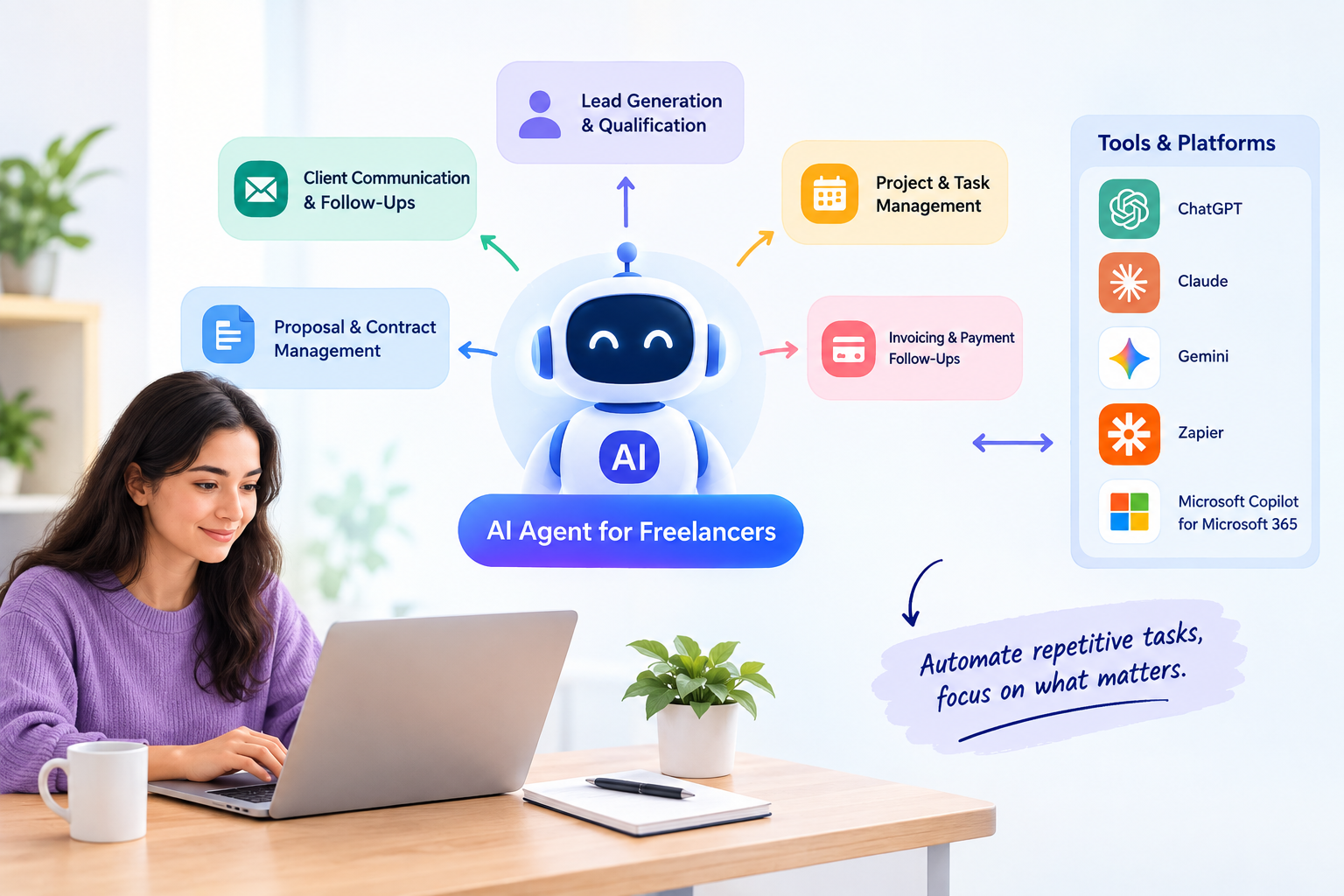
Lead Generation and Client Qualification
An agent can collect information from contact forms or emails, summarize requirements, identify the type of project, and prepare a suggested response.
The freelancer can then review the lead before deciding whether to continue the conversation. With an AI agent for freelancers handling initial lead research and qualification, you can spend more time speaking with serious prospects instead of manually searching for every opportunity.
Client Communication and Follow-Ups
AI can draft introductory emails, meeting confirmations, project updates, reminders, and follow-up messages. This can help freelancers maintain consistent communication without manually writing every routine message. For client communication, an AI agent for freelancers can help organize messages, draft follow-ups, summarize conversations, and remind you when a response is needed.
Proposal and Contract Management
An agent can organize client requirements and prepare proposal drafts using predefined templates. It can also remind the freelancer when a proposal requires approval or when a client has not responded. An AI agent for freelancers can also prepare proposal drafts using information about the client’s requirements, your services, pricing, and previous work. You can then review and personalize the proposal before sending it.
Project and Task Management
Once a project starts, the agent can convert requirements into tasks, summarize progress, identify upcoming deadlines, and prepare client status updates.
Invoicing and Payment Follow-Ups
AI automation can monitor invoice-related events and prepare payment reminders. Financial actions should generally remain under human control, particularly when they involve changing payment information or making financial decisions.
How to Create an AI Agent for Your Freelance Business
Step 1: Map Your Freelance Client Workflow
An AI agent for freelancers should follow this workflow closely so that automation supports the way you already manage clients and projects.
Start by documenting your current process:
Lead → Discovery Call → Proposal → Contract → Onboarding → Project → Updates → Delivery → Invoice → Follow-Up
Identify which activities happen repeatedly and which require human judgment.
This step is important because an AI agent for freelance business operations should be designed around a real process rather than around a particular AI tool.
Step 2: Choose the Right AI Model
You can use tools such as ChatGPT, Claude, or Gemini as the reasoning component of your workflow.
ChatGPT can support communication, analysis, research, and content-related tasks. Claude can be useful for document analysis and long-form information processing. Gemini can be useful for freelancers already working within Google’s ecosystem.
The right choice depends on your requirements, integrations, data, and existing software stack.
Step 3: Define the Agent’s Role and Instructions
Give your agent a clear objective.
For example:
Analyze every new client inquiry, summarize the requirements, identify missing information, classify the lead, and prepare a professional response for human approval. Clear instructions can make the workflow more predictable and easier to manage. For an AI agent for freelancers, these instructions should clearly define what the agent can do, what it cannot do, and when it should ask for human approval.
Step 4: Connect Your Tools and Applications
This is where Zapier and other automation platforms can become useful.
A workflow could look like:
New inquiry → AI analyzes request → Client record created → Email drafted → Freelancer approves → Meeting scheduled → Project created
Eduonix’s practical guide to building AI agents explains how modern agents combine models, tools, memory, APIs, and orchestration to perform real-world tasks.
Step 5: Test and Improve the Workflow
Test your agent with different situations before giving it permission to perform important actions.
Try incomplete client requests, unclear requirements, duplicate leads, unusual questions, and failed integrations.
Monitor the results and improve the instructions and workflow as you identify problems.
AI Tools You Can Use to Build a Freelance AI Workflow
ChatGPT
ChatGPT can support research, client communication, content generation, analysis, and other natural-language tasks.
Claude
Claude can assist with document-heavy workflows, analysis, summarization, and drafting.
Gemini
Gemini can provide AI assistance and can be particularly relevant for freelancers using Google’s ecosystem.
Zapier
Zapier can connect different applications and automate actions based on triggers. For example, a new form submission could trigger AI analysis and create a project-management task.
Microsoft Copilot for Microsoft 365
Microsoft Copilot can support freelancers working with applications such as Word, Outlook, Excel, and Teams.
These tools do not necessarily need to work separately. A practical AI agent management platform can combine an AI model with automation and business applications.
Together, these tools can help an AI agent for freelancers manage communication, tasks, documents, scheduling, and other routine business activities.
Example of an AI Agent Handling the Complete Freelance Client Workflow
The following example shows how an AI agent for freelancers can connect multiple client-management tasks into one workflow.
Imagine that a freelance web developer receives a new project inquiry.
The workflow first captures the inquiry and sends the information to the AI agent. The agent identifies the client’s industry, requested services, timeline, and project requirements.
It then creates a structured summary and checks whether essential information is missing. If something is unclear, the agent prepares a clarification email for the freelancer to review.
Once the freelancer approves the next step, the workflow can schedule a discovery meeting.
After the meeting, the AI agent can summarize the notes and convert the requirements into a preliminary project plan.
The agent can then prepare a proposal draft using an approved template. The freelancer reviews it before sending it to the client.
After acceptance, the workflow can create project tasks, organize documents, schedule milestones, and prepare regular status updates.
Once the project is delivered, the system can prepare an invoice reminder and schedule a follow-up.
This is how an agent for account management can become part of a broader freelance workflow rather than functioning as an isolated chatbot. Once connected to your project-management tools, an AI agent for freelancers can track tasks, deadlines, client requests, and delivery steps without requiring you to update every detail manually.
How AI Agents Can Improve Freelance Business Operations
The biggest opportunity is not simply generating more content. It is connecting individual tasks into a consistent process. An AI agent for freelancers can bring these connected tasks together, helping freelancers reduce repetitive work while maintaining control over important client decisions.
For example, information collected during lead generation can become context for the discovery call, proposal, project plan, and follow-up. This reduces repeated data entry and creates a more organized client experience.
AI agents can also support AI agents for freelance business development by helping organize leads, prepare outreach drafts, identify follow-up opportunities, and maintain client communication.
Eduonix’s article on how AI agents coordinate work across software systems explains how agents can coordinate actions across different components instead of simply completing isolated tasks.
For freelancers, the same principle can be applied at a smaller scale across email, calendars, project-management platforms, documents, and CRM systems.
Best Practices for Managing an AI Agent
Keep Humans in the Loop
Human approval should remain part of important processes such as contracts, proposals, financial decisions, and sensitive client communications.
Protect Client and Business Data
Only provide the agent with the information and permissions it needs. Use secure authentication and appropriate access controls for connected applications.
Give Your AI Agent Clear Instructions
Define the agent’s role, goals, available tools, limitations, expected output, and escalation rules.
Monitor and Improve Automated Workflows
Review successful and failed executions. If an agent makes a mistake, determine whether the problem came from the instructions, data, integration, or workflow design.
An effective ai agent management process should include regular testing and refinement rather than assuming the initial configuration will always work correctly.
Common Mistakes to Avoid When Building an AI Agent
One common mistake is attempting to automate everything at once. Start with one repetitive workflow and expand only after it works reliably.
Another mistake is treating an AI agent as a completely independent employee. AI systems can misunderstand context, produce incorrect information, or encounter integration failures.
Giving an agent excessive permissions is another risk. An agent should have access only to the tools and actions required for its defined purpose.
Finally, avoid measuring success only by the number of automated tasks. A useful system should save time while maintaining quality, security, and a good client experience.
How to Get Started With AI Automation for Freelance Work
Choose one repetitive task such as lead qualification, client follow-ups, meeting summaries, or project updates.Starting with one focused process makes it easier to build an AI agent for freelancers, test its performance, and expand automation gradually.
Document the existing process and separate the activities that require human judgment from those that can be automated.
Then select an AI model and automation platform. Build a small workflow and test it with several realistic scenarios.
Once the workflow works consistently, add another process.
Over time, these individual automations can become an integrated ai workflow automation freelance system that supports lead management, client communication, project management, and business operations.
For beginners who want a practical starting point, Eduonix also provides a step-by-step guide to building your first AI agent, including workflow planning, automation, and tool integration.
Frequently Asked Questions About AI Agents for Freelancers
What is an AI agent for freelancers?
An AI agent for freelancers is a software system that can understand a goal, use connected tools, and complete multiple steps in a freelance workflow with limited human intervention.
How can freelancers use AI agents to manage clients?
Freelancers can use agents for lead qualification, communication drafts, scheduling, onboarding, project management, follow-ups, and other repetitive client-management activities.
How do I create an AI agent for my freelance business?
Start by mapping one workflow, selecting an AI model, defining clear instructions, connecting the required tools, and testing the workflow before expanding it.
Can AI agents automate the entire freelance client workflow?
AI agents can automate many parts of the client workflow, but complete autonomy is not always appropriate. Important decisions and sensitive client-facing activities should generally include human review.
What is the best AI tool for freelance workflow automation?
There is no single tool that works for every freelancer. ChatGPT, Claude, Gemini, Zapier, and Microsoft Copilot for Microsoft 365 have different capabilities, so the appropriate combination depends on the workflow.
Can ChatGPT be used as an AI agent for freelance work?
ChatGPT can support agent-based workflows when combined with appropriate instructions, tools, and integrations. The exact capabilities depend on the implementation.
How can Zapier connect an AI agent to freelance business tools?
Zapier can connect applications through triggers and actions, allowing information to move between forms, email, calendars, project-management tools, and other services.
Are AI agents safe to use with client information?
AI agents can be used responsibly when appropriate security controls, permissions, data-handling practices, and human review are implemented. Freelancers should avoid giving agents unnecessary access to sensitive information.
Final Thoughts: Building a Smarter Freelance Workflow With AI
An AI agent for freelancers is most useful when it solves a genuine workflow problem.
Instead of trying to automate every part of a freelance business, start with repetitive activities that consume time without requiring constant human judgment. Building an AI agent for freelancers is not about replacing your role; it is about automating repetitive parts of your client workflow so you can focus on higher-value creative and business work.
The combination of an AI model, automation platform, business applications, clear instructions, and human oversight can