Introduction
React Server Components are transforming how developers build modern web applications by allowing components to render in a server environment rather than sending all component logic to the browser. This server-first approach can reduce client-side JavaScript, simplify data fetching, and improve the initial loading experience when implemented correctly.
Traditional React applications often rely on JavaScript running in the browser to fetch data, update interfaces, and manage application state. As applications become larger, this approach can increase bundle sizes and affect performance, especially on slower devices or networks.
React Server Components provide another way to structure applications. Developers can render content and retrieve data on the server while keeping interactive features, such as search fields, dropdowns, and buttons, in Client Components.
For developers working with React, Next.js, JavaScript, and TypeScript, understanding this architecture is increasingly important. This guide explores how React Server Components work, their benefits, their differences from server-side rendering (SSR), and how to use them effectively in modern web development.
What Are React Server Components?
React Server Components are React components that render in an environment separate from the browser application. Depending on the framework, they can execute during a build or on a server in response to a request.
Unlike Client Components, Server Components do not send their component implementation to the browser as client-side JavaScript. Instead, React generates a special representation of their output that the framework uses to construct the user interface.
This makes them useful for content-heavy pages, product listings, dashboards, documentation websites, and applications that retrieve information from databases or APIs.
Understanding React Server Components
Imagine an online store with product names, descriptions, prices, reviews, and an add-to-cart button.
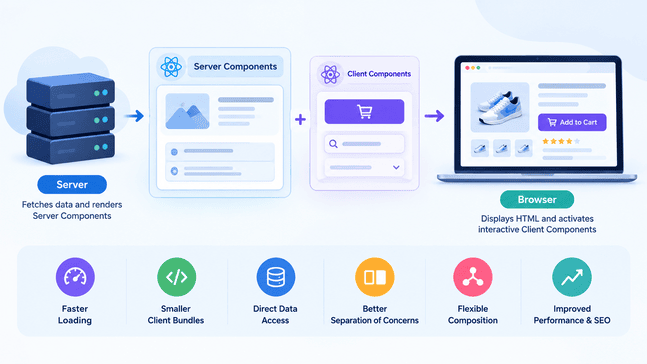
The product information can be retrieved and rendered by a Server Component. The add-to-cart button can be a Client Component because it needs to respond to user interactions.
This approach avoids making every component responsible for browser-side behavior.
According to the official React documentation on Server Components, these components can run at build time or on a server, depending on the application setup.
How Server Components Render
In a framework such as Next.js, the rendering process typically involves these steps:
- The server executes the relevant Server Components.
- React creates a React Server Component Payload describing the rendered component tree and references to Client Components.
- The framework can use the payload and Client Components to generate HTML for the initial page.
- The browser displays the HTML and uses JavaScript to make interactive Client Components functional.
The precise process varies according to the framework and rendering strategy.
React Server Components are not simply another name for SSR. Server Components describe where components execute, whereas SSR refers to generating HTML on the server. An application can use both approaches together.
React Server Components Example
The following example demonstrates how TypeScript can fetch product data from an API and display the results in the console. This simplified example illustrates asynchronous data fetching, but it does not render a React Server Component or a webpage.
type Product = {

  id: number;

  name: string;

};

async function getProducts(): Promise<Product[]> {

  // Sample data instead of an external API request

  return [

    { id: 1, name: "Laptop" },

    { id: 2, name: "Keyboard" },

    { id: 3, name: "Mouse" },

  ];

}
async function main() {

  const products = await getProducts();

  console.log("Products:");

  products.forEach((product) => {

    console.log(`${product.id}: ${product.name}`);

  });

}

main().catch(console.error);
The API URL is a placeholder and must be replaced with a real endpoint. The example also assumes that the response matches the declared data structure.
Because this component does not need browser-side state or event handlers, it can remain on the server. This is a practical example of how React Server Components can simplify data-driven pages.
How Server-First Architecture Works
Server-first architecture means deciding which application responsibilities belong on the server and which require the browser.
Instead of sending every component and its logic to the client, developers can retrieve data and render content on the server while using Client Components for interactive features.
The Server and Client Environments
The server and browser have different capabilities.
Server Components can retrieve data through server-side application code, access protected resources through secure server-only modules, and render content without adding their component implementation to the client-side JavaScript bundle.
Client Components support state, event handlers, effects, and browser APIs. They are necessary for features such as interactive forms, modal windows, live search, and shopping cart controls.
A simplified application architecture looks like this:
Database or API → Server Component → Rendered content → Browser
Interactive features also load the JavaScript required by their Client Components.This separation helps developers avoid turning an entire page into a Client Component just because one small section needs interactivity.
Data Fetching and Rendering
In a client-heavy application, a component might initially display an empty state and then fetch data after JavaScript executes in the browser.
With React Server Components, a supported framework can retrieve data during server rendering. This may eliminate unnecessary client-side requests and reduce the work required in the browser.
However, moving data fetching to the server does not automatically make an application faster. Database performance, network latency, caching, server capacity, and rendering decisions remain important.
For more practical performance strategies, read CodeCondo’s guide to optimizing web applications with modern techniques and tools.
The Role of Modern Meta-Frameworks
React provides the Server Components model, while frameworks help developers implement routing, bundling, rendering, and delivery.
Next.js is one of the best-known frameworks supporting React Server Components. Its App Router uses Server Components by default for pages and layouts, allowing developers to add Client Components when interactivity is needed.
Other React frameworks may support Server Components differently. Always consult the relevant framework documentation before choosing an architecture or assuming that every React setup supports the same features.
React Server Components vs. SSR and Client Components
React Server Components, SSR, and Client Components are related technologies, but they solve different problems. Understanding the differences helps developers select the right rendering strategy.
React Server Components vs. Server-Side Rendering
Server-side rendering generates HTML on the server and sends it to the browser. This can make page content available before all client-side JavaScript has loaded.
React Server Components determine where components execute and how their output participates in the application’s rendering process.
| Feature | React Server Components | Server-Side Rendering |
| Primary purpose | Execute components in a server environment | Generate HTML on the server |
| Client JavaScript | Server Component implementation stays off the client | Depends on the application and its components |
| Data access | Can use server-side data sources through application code | Depends on the rendering implementation |
| Interactivity | Uses Client Components when browser interaction is required | Interactive features generally need client JavaScript |
| Relationship | Can participate in server-rendered applications | Can work alongside Server Components |
These approaches are complementary rather than mutually exclusive. A modern framework may use Server Components while also generating HTML for the initial page.
React Server Components vs. Client Components
Client Components are useful when an interface requires browser-side behavior. In Next.js, developers establish a Client Component entry point with the “use client” directive.
For example:
"use client";

import { useState } from "react";

export default function Counter() {

  const [count, setCount] = useState(0);

  return (

    <button onClick={() => setCount(count + 1)}>

      Count: {count}

    </button>

  );

}
This component needs client-side JavaScript because it uses state and an event handler.
A Server Component is more suitable for retrieving and displaying data that does not require browser interaction. Combining the two allows developers to preserve server-side rendering for content while delivering interactivity where necessary.
When to Use Each Rendering Approach
Use Server Components when you need to retrieve data close to its source, keep server-only logic out of the browser bundle, or render content that does not require client-side interaction.
Use Client Components when you need state, effects, event handlers, or browser APIs.
Use SSR when generating HTML on the server supports your application’s initial rendering, content delivery, or indexing requirements.
For a broader discussion of rendering strategies and search visibility, see CodeCondo’s article on single-page application SEO best practices.
7 Powerful Benefits of React Server Components
React Server Components offer several architectural benefits. The actual results depend on the application’s design, framework configuration, and performance requirements.
1. Reduced Client-Side JavaScript
Server Components do not add their component implementation to the browser’s JavaScript bundle. This can reduce the amount of JavaScript users must download, parse, and execute.
For example, article text, product descriptions, and category lists may not need browser-side component logic.
Smaller client bundles can improve loading experiences, particularly on low-powered devices. The final bundle size still depends on the Client Components and dependencies used throughout the application.
2. Direct Server-Side Data Access
Server Components can retrieve information through server-side application code instead of requiring every data request to pass through a separate client-facing API route.
A dashboard, for example, can load account information on the server and pass only the required display data to an interactive chart.
A separate API can still be useful for mobile apps, external integrations, or independently consumed services. The best approach depends on the application’s architecture.
3. Improved Loading Experience
React Server Components can work with framework features such as streaming and Suspense to allow parts of a page to become available while slower content continues loading.
This can make an application feel more responsive when loading boundaries are designed thoughtfully.
However, slow database queries and poorly structured loading states can still delay important content. Developers should measure real performance rather than assume that the architecture guarantees faster rendering.
4. Better Separation of Responsibilities
Separating server-side content rendering from browser-side interaction can make components easier to maintain.
A Server Component can handle data retrieval and content structure, while a Client Component manages state and user actions.
This division helps prevent unnecessary client-side dependencies and makes the application’s execution boundaries clearer.
5. More Efficient Data Fetching
Server-side data access can reduce unnecessary client-to-server round trips. When data is available close to the rendering process, the application may be able to prepare the interface more efficiently.
Developers must still manage caching, duplicate requests, query performance, and error handling. Server Components simplify certain workflows but do not eliminate the need for careful data-layer design.
6. Flexible Component Composition
Server and Client Components can be combined within the same interface.
For example, a product page can render descriptions and pricing on the server while using Client Components for an image gallery, review filter, or add-to-cart button.
Framework-supported composition patterns allow developers to keep content rendering on the server without sacrificing a responsive user experience.
7. Potential Performance and SEO Benefits
React Server Components can support performance improvements by reducing unnecessary client JavaScript and helping applications organize server-side rendering.
These benefits may contribute to better user experiences and support search visibility, but Server Components do not guarantee higher search rankings or improved Core Web Vitals.
SEO also depends on useful content, crawlable links, appropriate metadata, accessibility, server response times, and other technical factors.
How to Use React Server Components with Next.js
Next.js provides a practical way to use React Server Components in full-stack web applications. Its App Router supports Server Components by default for pages and layouts.
Understanding the Next.js App Router
The App Router uses the app directory to organize routes, pages, layouts, and loading states.
A simple project structure might look like this:
app/
layout.tsx
page.tsx
products/
page.tsx
components/
AddToCart.tsx
The products page can retrieve product information on the server, while the AddToCart component can handle browser-side interactions.
For implementation details, consult the official Next.js documentation on Server and Client Components.
For a practical walkthrough of production-ready React architecture, explore building React apps with Server Components and the Next.js App Router. It explains how Server Components, routing, data fetching, and Client Components work together in modern applications.
Building a Basic Server Component
A simple React Server Component can be implemented as an asynchronous function that retrieves product information and uses it to render a webpage. In a Next.js application, the component can call a data-access function to obtain details such as a product’s name and description.
Once the data is available, the component displays the product information within the page. Because this content does not require browser-side interaction, it can be rendered on the server without adding the component’s implementation to the client-side JavaScript bundle.
This approach is useful for product pages, content-driven websites, and other applications that need to retrieve and display data efficiently. In production applications, developers should also implement appropriate error handling, caching strategies, and loading states to ensure a reliable user experience.
Adding Client-Side Interactivity
When an interface requires browser-side functionality, create a separate Client Component and mark its entry point with “use client”.
For example, an add-to-cart control may manage temporary interface state while product information remains rendered by a Server Component.
Keep the client boundary as small as practical. If only one button requires interactivity, the entire page usually does not need to become a Client Component.
Handling Data and Loading States
Applications must account for slow responses, missing records, failed requests, and changing data.
Next.js supports loading interfaces and React Suspense patterns that can help display useful content while slower operations continue.
Caching also requires attention. Incorrect caching rules can expose user-specific information or display stale content. Authentication and authorization must always be enforced on the server.
React Server Components with JavaScript and TypeScript
React Server Components work with JavaScript and TypeScript in supported React frameworks. The choice of language does not change the fundamental distinction between server execution and browser-side interaction.
Using JavaScript for Server Components
JavaScript is sufficient for writing Server Components. Developers can use asynchronous functions, import server-side data-access modules, and return JSX.
The important consideration is the execution environment. A Server Component should not depend on browser-only APIs such as window or localStorage.
Type-Safe Components with TypeScript
TypeScript helps developers define the data passed between components and catch mistakes during development.
For example:
type Article = {
title: string;
summary: string;
};

async function getArticle(): Promise<Article> {
return {
title: "React Server Components",
summary: "A guide to server-side rendering with React.",
};
}

async function main() {
const article: Article = await getArticle();

console.log(article.title);
console.log(article.summary);
}

main().catch(console.error);
The getArticle() function must return data that matches the declared type. TypeScript does not automatically validate external API responses at runtime, so untrusted data should be validated where appropriate.
For related full-stack development techniques, explore Eduonix’s guide to full-stack TypeScript with tRPC, TanStack Query, and Prisma.
Common Implementation Patterns
When building applications with JavaScript and TypeScript:
- Keep database access in server-only modules.
- Pass only the data required by Client Components.
- Avoid importing server-only modules into client-side code.
- Define clear types for component props and application data.
- Validate external data at runtime where necessary.
- Keep interactive state in the components that need it.
These practices make applications easier to understand, test, and maintain.
Challenges and Best Practices
Although React Server Components can simplify application architecture, developers must still make careful decisions about rendering, security, caching, and component boundaries.
Understanding Client Boundaries
A common mistake is marking an entire component tree with “use client” just to enable one interactive feature.
Imports from a Client Component entry point become part of the client module graph, potentially increasing the JavaScript shipped to the browser.
Instead, isolate interactive components wherever practical and keep content-rendering components on the server.
Protecting Sensitive Server Data
Server-side execution does not automatically make an application secure. Developers must implement authentication, authorization, input validation, and appropriate data handling.
Never pass private API keys, passwords, or unnecessary sensitive records to Client Components. Treat any data sent to the browser as potentially visible to the user.
Managing Caching and Errors
Caching can improve performance, but developers must understand when information is cached, refreshed, or scoped to a particular user.
Use appropriate error handling, loading states, and monitoring. Test failed requests and authorization errors as well as successful responses.
Measuring Performance Before and After Implementation
Evaluate actual results instead of relying on architectural assumptions.
Useful measurements include:
- Client JavaScript bundle size.
- Initial response and rendering times.
- Core Web Vitals.
- Number of network requests.
- Server response times and database latency.
- Accessibility and usability during loading.
Compare results under realistic network and device conditions. React Server Components are most valuable when they solve a specific performance or maintainability problem.
Frequently Asked Questions
What Are React Server Components?
React Server Components are components that render in an environment separate from the browser application. They can retrieve data and generate rendered output without sending their component implementation as client-side JavaScript.
Are React Server Components the Same as SSR?
No. Server Components describe where components execute, while server-side rendering describes generating HTML on the server. Frameworks can use both approaches together.
Can Server Components Use React Hooks?
Server Components cannot use client-only hooks such as useState and useEffect. Some React APIs are supported in Server Components, but availability depends on the API and execution environment. Use Client Components for interactive state and effects.
Does Next.js Support React Server Components?
Yes. The Next.js App Router supports Server Components by default for pages and layouts. Developers can introduce Client Components when browser-side interactivity is needed.
Do React Server Components Improve Performance?
They can reduce client-side JavaScript and improve data-fetching workflows. Actual performance depends on application design, server response times, caching, network conditions, and the amount of client-side code.
Conclusion
React Server Components provide a flexible way to build applications that use the server for data access and content rendering while reserving the browser for genuine interactivity.
Their main benefits include reducing unnecessary client-side JavaScript, simplifying certain data-fetching workflows, and separating server-side responsibilities from interactive interface elements.
However, React Server Components are not a universal replacement for SSR or Client Components. Effective applications combine these approaches according to their requirements and use a supported framework to manage rendering and delivery.
For developers working with React, Next.js, JavaScript, and TypeScript, learning this model provides a foundation for building maintainable, performance-conscious web applications. Start with a small server-rendered page, introduce Client Components only where necessary, and measure the results before changing the architecture of an entire application.