Introduction
Real-time game analytics helps game developers understand player behavior, monitor gameplay performance, and make informed live-operations decisions. From multiplayer matches to in-game purchases, every player interaction can generate useful data. However, turning millions of events into actionable insights requires an analytics pipeline that can handle changing data structures, large files, and frequent queries.
Real-time game analytics plays a crucial role in modern game development by helping studios understand player behavior, track gameplay performance, and monitor in-game activities as they happen. With effective real-time game analytics, developers can identify player engagement trends, measure retention rates, analyze in-game purchases, detect performance issues, and make data-driven decisions. By using real-time game analytics with tools like DuckDB 2.0 LTS, gaming teams can transform player telemetry into actionable insights, improve live-ops strategies, and create better gaming experiences.
DuckDB 2.0 LTS offers new capabilities for building these workflows. Its asynchronous I/O, VARIANT type, Quack protocol, and SQL triggers can help developers analyze player telemetry, organize game events, and maintain summary tables for dashboards.
For teams working with Unity game analytics, Firebase game analytics, or custom telemetry systems, DuckDB can serve as an analytical engine alongside existing collection services. The objective is not simply to store more events. It is to transform raw gameplay activity into insights that improve retention, balancing, monetization, and player experience.
This guide explores practical architecture choices, migration considerations, and query patterns for building a game analytics pipeline with DuckDB.
Implementing real-time game analytics allows developers to track player activities, identify gameplay trends, and respond quickly to changes in player behavior. By using real-time game analytics, gaming companies can monitor important metrics such as player retention, session duration, in-game purchases, and game performance. These insights help development teams make data-driven decisions, improve gameplay experiences, and build more engaging games.
1. Why Real-Time Game Analytics Matters for Live-Ops
From player events to actionable insights
Live-service games change continuously. Developers release new content, adjust difficulty, introduce limited-time events, and investigate unexpected player behavior. Decisions become easier when teams can examine fresh telemetry rather than waiting for manually prepared reports.
A real-time game analytics workflow may track:
- Session starts, endings, and duration.
- Level completion and abandonment rates.
- Matchmaking times and match outcomes.
- In-game purchases and virtual currency spending.
- Crash reports, errors, and performance measurements.
- Retention patterns following updates or live events.
Suppose a game introduces a difficult boss encounter. Analytics can reveal how many players attempt the encounter, how often they fail, how long they spend fighting, and whether they leave the game afterward. These signals help designers determine whether the encounter needs adjustment.
The same approach supports live-ops campaigns. Developers can compare participation in seasonal events, evaluate rewards, and identify whether a promotion changes player engagement.
Where DuckDB fits in the analytics architecture
DuckDB is an analytical database designed for workloads such as filtering, aggregating, and joining datasets. Its columnar execution engine makes it useful for exploring large collections of structured telemetry.
However, real-time game analytics does not automatically mean instantaneous analytics. The time between a player action and a dashboard update depends on event delivery, buffering, storage, query execution, and dashboard refresh frequency.
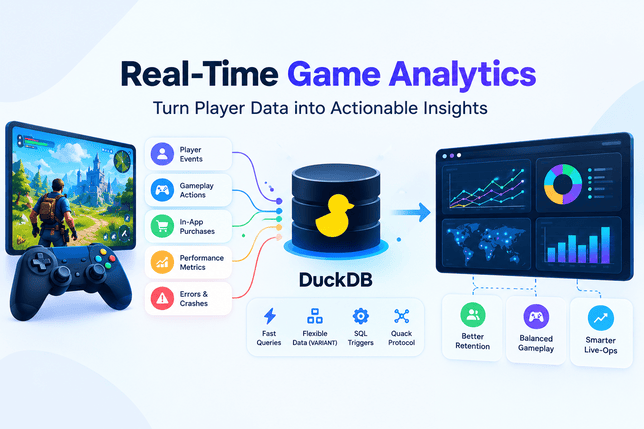
A practical architecture separates these responsibilities:
- Collection: Unity SDKs, Firebase services, or custom game clients produce events.
- Ingestion: Backend services validate, batch, and deliver events.
- Storage: Events are retained in Parquet files, object storage, or another suitable system.
- Analysis: DuckDB queries telemetry and calculates gameplay metrics.
- Presentation: Dashboards display results to designers, analysts, and live-ops teams.
DuckDB is particularly useful in the analytical layer. It can also run within an application or connect to a shared instance through Quack, depending on deployment requirements. It does not independently replace every component of an event-streaming platform.
2. Design a Game Analytics Pipeline with DuckDB
Collect telemetry from Unity and Firebase
Unity game analytics and Firebase game analytics can provide useful starting points for collecting gameplay events. The appropriate choice depends on the game engine, existing integrations, reporting needs, and operational requirements.
Unity developers should review Unity Gaming Services Analytics documentation to understand event collection and available analytics capabilities. Firebase developers can consult Google Analytics for Firebase for event tracking and reporting.
These systems should be treated as potential data sources, not interchangeable components. Their SDKs, event schemas, export mechanisms, and reporting capabilities differ.
For example, a role-playing game might record an event whenever a player completes a quest. The event could include a player identifier, timestamp, quest identifier, difficulty, completion status, and session identifier.
A racing game might collect lap times, vehicle selection, race results, and track conditions instead. Both generate telemetry, but their event structures reflect different gameplay mechanics.
A well-designed event schema should include:
- A unique event identifier for deduplication.
- A timestamp indicating when the event occurred.
- An event name describing the player action.
- A pseudonymous player or session identifier.
- A schema version where appropriate.
- Relevant gameplay attributes.
Avoid collecting personal information that is unnecessary for analytics. Apply appropriate consent, retention, and access controls, particularly when serving players across different jurisdictions.
Separate ingestion, storage, and analysis
A reliable game analytics pipeline should not require every gameplay event to trigger a complex analytical query immediately.
Instead, collect events efficiently, buffer them when appropriate, and write batches to durable storage. Parquet is useful for analytical datasets because it supports column-oriented storage and efficient reading of selected columns.
DuckDB can then analyze those files without requiring the entire dataset to be loaded into application memory.
Consider a pipeline that stores daily gameplay events in object storage. An analyst could query session duration, compare quest completion rates, and investigate purchase patterns across multiple days.
This design also makes it easier to replay historical events, reproduce reports, and compare metrics before and after a game update.
For small games, DuckDB may run directly within an analytics application. Larger deployments may need a dedicated ingestion service, shared query infrastructure, or a separate streaming platform. The architecture should match event volume, latency expectations, concurrency, and reliability requirements.
For additional game-engine context, see CodeCondo’s guide to Godot vs Unity.
3. Migrate Existing Analytics Workloads to DuckDB 2.0 LTS
Audit dependencies and database files
Moving an existing analytics workload to DuckDB 2.0 LTS requires more than changing a version number. Teams should inventory their database files, queries, extensions, client libraries, scheduled jobs, and downstream dashboard connections.
Start by documenting the current workflow:
- Where telemetry is collected and stored.
- Which queries generate daily and live-ops reports.
- How frequently dashboards refresh.
- Which integrations depend on specific DuckDB versions.
- How database backups and recovery are handled.
DuckDB 2.0 introduces a new default database-file storage format. Database files created in the new format cannot be read by versions before 2.0, although DuckDB 2.0 can read and write existing database files from earlier versions. This makes compatibility testing especially important when multiple versions or processes share analytical data.
Test the migration before production
A safe migration begins with a staging environment containing representative telemetry. Include normal sessions, unusually large events, missing attributes, duplicate records, and data from different game versions.
Run the existing reports against both environments and compare:
- Total event counts.
- Unique player and session counts.
- Revenue and purchase totals.
- Retention calculations.
- Query duration and memory usage.
- Dashboard results and refresh behavior.
Investigate discrepancies before switching production workloads.
Also verify extension compatibility and the availability of the required client libraries. The official release announcement notes that some client libraries and extensions may become available after the initial release.
For mission-critical workloads, review the official DuckDB 2.0 migration guide and test rollback procedures before deploying.
A migration is successful only when the analytical results remain correct and the operational workflow behaves as expected.
4. Use Asynchronous I/O for Large Telemetry Datasets
Analyze Parquet and CSV data efficiently
One of the important improvements in DuckDB 2.0 is asynchronous I/O. Instead of requiring a worker to remain idle while waiting for data, DuckDB can schedule reads in the background while other work proceeds.
This is especially useful when a game analytics query reads data from remote object storage, where network latency can become a bottleneck.
Imagine a multiplayer game producing millions of match events each day. An analyst wants to compare average match duration across regions and game versions. If the events are stored in Parquet files in object storage, asynchronous I/O can help overlap data retrieval with query processing.
The benefit depends on the workload. Queries limited by CPU computation may gain less than queries that spend significant time waiting for remote data.
DuckDB 2.0 supports asynchronous I/O for Parquet files and uncompressed, seekable UTF-8 CSV files. Other formats, including JSON and DuckDB’s native database format, use synchronous I/O.
Tune concurrency and read-ahead carefully
DuckDB manages query-processing threads separately from its asynchronous I/O thread pool. The async_threads setting controls the number of threads dedicated to blocking I/O operations, while read_ahead_depth controls how far ahead reads can be scheduled.
These settings should be tuned using representative telemetry workloads rather than arbitrary maximum values.
Increasing concurrency may help remote reads, but it can also increase resource consumption. This matters when several DuckDB instances run in the same application or on the same machine.
Practical tuning steps include:
- Measure baseline query duration and throughput.
- Compare local-file and remote-object-storage performance.
- Monitor memory consumption during large scans.
- Test different thread counts under concurrent workloads.
- Confirm that read-ahead does not exceed available memory budgets.
The goal is to reduce the time spent waiting for data without making resource usage unpredictable.
Asynchronous I/O also does not replace an event-ingestion system. It improves supported data-reading operations; it does not automatically stream player events from a Unity client into a live dashboard.
5. Query Flexible Player Events with the VARIANT Type
Handle changing event schemas
Game telemetry rarely stays static. A developer may add a new weapon attribute, introduce a seasonal event, or change how match results are recorded. Requiring every event to follow an identical structure can make evolving analytics pipelines harder to maintain.
DuckDB 2.0 introduces VARIANT as a first-class type for semi-structured data. It can store values with different structures while supporting analytical processing. This is useful when player events contain optional fields or when different game systems generate different attributes.
Implementing real-time game analytics allows game studios to turn raw player telemetry into meaningful insights. With DuckDB 2.0 LTS, developers can explore large datasets, analyze flexible event structures, and generate useful reports for live-ops teams. Combining accurate data collection with efficient analytics helps improve player retention, evaluate game performance, and make smarter decisions throughout the game development lifecycle.
For example, a combat event might contain a weapon identifier and damage value, while a purchase event contains an item identifier and virtual currency amount. Both can share common event metadata without requiring every event to contain every possible attribute.
The benefit is flexibility, not the elimination of data-quality rules. Important fields still need validation, and analysts should define consistent meanings for metrics such as revenue, session duration, and player retention.
Build useful gameplay metrics with SQL
A practical telemetry query should answer a specific product or design question.
Examples include:
- Which levels have the highest abandonment rate?
- Which weapons have unusually high win rates?
- How does the average session duration change after an update?
- Which live-ops events attract returning players?
- Do purchase patterns differ between new and experienced players?
The following single SQL example illustrates a simplified analytical workflow. It assumes a player_events table has already been populated, with common columns for the event timestamp, event name, player identifier, and a VARIANT payload containing event-specific attributes. The exact extraction expressions should be checked against the deployed DuckDB 2.0 SQL interface and your event schema.
— Example: summarize recent player activity and quest outcomes.
— Assumes player_events contains:
— event_time, event_name, player_id, and a VARIANT payload.
STEP 1: Create the player_events table

CREATE TABLE player_events (
event_time TIMESTAMP,
event_name VARCHAR,
player_id INTEGER,
payload JSON
);

-- STEP 2: Insert sample gameplay events

INSERT INTO player_events VALUES
(CURRENT_TIMESTAMP - INTERVAL '2 hours', 'session_start', 101, '{"platform":"PC"}'),
(CURRENT_TIMESTAMP - INTERVAL '1 hour', 'quest_completed', 101, '{"quest":"Dragon Hunt"}'),
(CURRENT_TIMESTAMP - INTERVAL '3 hours', 'session_start', 102, '{"platform":"Mobile"}'),
(CURRENT_TIMESTAMP - INTERVAL '2 hours', 'quest_completed', 102, '{"quest":"Forest Mission"}'),
(CURRENT_TIMESTAMP - INTERVAL '5 hours', 'session_start', 103, '{"platform":"PC"}'),
(CURRENT_TIMESTAMP - INTERVAL '4 hours', 'session_start', 104, '{"platform":"Console"}'),
(CURRENT_TIMESTAMP - INTERVAL '30 hours', 'quest_completed', 105, '{"quest":"Old Mission"}'),
(CURRENT_TIMESTAMP - INTERVAL '30 minutes', 'quest_completed', 103, '{"quest":"Final Boss"}');

-- STEP 3: Analyze recent player activity and quest outcomes

WITH recent_events AS (
SELECT
event_time,
event_name,
player_id,
payload
FROM player_events
WHERE event_time >= CURRENT_TIMESTAMP - INTERVAL '24 hours'
),

daily_activity AS (
SELECT
CAST(event_time AS DATE) AS activity_date,
COUNT(*) AS total_events,
COUNT(DISTINCT player_id) AS active_players,
COUNT(*) FILTER (
WHERE event_name = 'session_start'
) AS sessions_started,
COUNT(*) FILTER (
WHERE event_name = 'quest_completed'
) AS quests_completed
FROM recent_events
GROUP BY CAST(event_time AS DATE)
)

SELECT
activity_date,
total_events,
active_players,
sessions_started,
quests_completed
FROM daily_activity
ORDER BY activity_date DESC;
This query calculates a basic activity summary. It can support a dashboard showing event volume, active players, session starts, and quest completions.
For more detailed analysis, the pipeline can extract attributes from VARIANT payloads to compare weapons, regions, difficulty levels, or purchase categories. Validate the appropriate VARIANT extraction functions against the official DuckDB documentation.
Remember that event counts are not the same as unique sessions, and daily active players are not the same as retention. Retention requires tracking whether players return during a defined period after their initial activity. Purchase totals also need careful handling of currencies, refunds, duplicate events, and test transactions.
A well-designed game analytics pipeline makes these definitions explicit so that developers and business teams interpret the dashboard consistently.
6. Connect Analytics Services with the Quack Protocol
Query a shared DuckDB instance
DuckDB traditionally operates as an embedded analytical database. With DuckDB 2.0, the Quack protocol provides a more developed option for connecting to a shared DuckDB instance over a network.
This can help separate analytical processing from the applications that collect or display results. For example, a game studio might operate a central analytics service that reads stored telemetry and serves queries from internal reporting tools.
A possible architecture includes:
- An ingestion service that writes telemetry to storage.
- A DuckDB instance that performs analytical queries.
- A dashboard backend that requests summarized results.
- Internal users who access reports through an authenticated application.
Quack supports remote database connectivity, while the CONNECT statement provides a way to establish connections through DuckDB’s SQL interface. The exact deployment should follow the current protocol documentation.
Real-time game analytics helps developers understand player behavior, monitor gameplay performance, and identify opportunities to improve player engagement. By analyzing gameplay events, session activity, and in-game purchases, studios can make informed decisions about game updates, difficulty balancing, and monetization strategies. A reliable real-time game analytics system also helps teams respond to changing player needs and deliver a better gaming experience.
This approach may be useful when several internal tools need access to the same analytical workload. However, it should not be interpreted as an automatic solution for every concurrent-write or high-availability requirement.
Secure access to remote analytics
Game telemetry can reveal player behavior, purchasing patterns, and other sensitive operational information. A shared analytics service therefore needs clear security boundaries.
Before making a remote instance available, teams should:
- Restrict network access to trusted services.
- Authenticate clients and protect credentials.
- Use an appropriate secure transport or reverse-proxy configuration.
- Separate development, staging, and production environments.
- Apply access controls to player-level data and sensitive reports.
- Monitor resource consumption and failed connections.
Review the official Quack extension documentation and its security guidance before exposing an instance beyond a trusted environment.
Quack should be selected because the architecture benefits from shared database access, not merely because a new protocol is available. Some workloads are better served by embedded DuckDB instances, scheduled analytical jobs, or an established data platform.
7. Use Triggers and Build Live-Ops Dashboards
Maintain summary tables automatically
DuckDB 2.0 adds SQL triggers, which can execute actions in response to supported table changes. This creates opportunities to maintain derived information as the underlying data changes.
For game analytics, imagine a summary table that tracks event counts by category or maintains aggregates used by a reporting service. Triggers can help keep such summaries updated without requiring every consumer to recalculate the same values independently.
Possible applications include:
- Recording changes to analytical reference tables.
- Maintaining selected summary statistics.
- Auditing updates to event classifications.
- Enforcing certain data-integrity rules.
- Updating derived information after supported data modifications.
Triggers should not be confused with a complete streaming engine. They execute in response to database changes; they do not independently collect events from game clients or guarantee instant dashboard delivery.
Design them carefully to avoid unnecessary work on high-volume tables. A trigger that performs an expensive aggregation for every incoming event may become a bottleneck. For large batches, statement-level operations or scheduled aggregation may be more appropriate, depending on the supported trigger behavior and workload.
Review the official DuckDB trigger documentation for syntax, supported combinations, and current limitations.
Design dashboards for practical decisions
A useful live-ops dashboard should focus on questions that a developer or operator can act on.
| Dashboard metric | What it helps reveal |
| Active players | Current or recent participation, according to the defined time window |
| Session duration | How long players remain engaged |
| Quest completion rate | Whether progression content is too difficult or too easy |
| Match abandonment | Potential matchmaking, stability, or gameplay problems |
| Purchase conversion | How players respond to monetization opportunities |
| Event participation | Whether a live-ops campaign attracts players |
| Crash or error rate | Whether a release may be affecting stability |
| Return rate | Whether players come back after a defined interval |
These metrics need consistent definitions and suitable time windows. A dashboard updated every few minutes can be operationally useful even when it is not instantaneous.
Separate operational monitoring from strategic analysis. Operators may need quick alerts about crashes or failed purchases, while designers may need longer-term comparisons across levels, cohorts, and game versions.
DuckDB can provide analytical results for these workflows, but dashboard delivery still requires an application, reporting tool, or visualization layer. Establish refresh schedules, caching rules, and access controls according to the needs of the team.
Best Practices for Reliable Game Analytics
Even a technically capable database cannot compensate for inconsistent telemetry or poorly defined metrics. Before deploying a real-time game analytics system, establish a few operational standards.
- Define event schemas. Maintain documentation for event names, required fields, timestamps, and attribute types. Version event structures when gameplay updates change the data being collected.
- Make ingestion resilient. Use batching, retries, and durable queues where appropriate. Deduplicate repeated events and monitor ingestion delays so that temporary failures do not silently distort reports.
- Validate metrics. Compare analytical results with known test scenarios. Verify time zones, session boundaries, currency conversions, and player-identification rules before relying on dashboards.
- Test performance realistically. Use representative event volumes and query patterns. Measure memory use, query latency, storage throughput, and concurrent dashboard demand.
- Protect player data. Use pseudonymous identifiers, limit access to individual-level records, and apply retention and deletion policies appropriate to your product and applicable regulations.
- Separate analytical and operational responsibilities. DuckDB can power detailed analysis, but latency-sensitive game services should not depend on an expensive analytical query completing successfully. Keep gameplay-critical transactions and urgent operational alerting on infrastructure designed for those responsibilities.
- Monitor the complete pipeline. Measure event collection delays, storage failures, query errors, dashboard freshness, and resource usage. A fast database is only one part of a reliable analytics system.
For broader engineering context, CodeCondo’s article on WebGPU and WebAssembly explores another example of choosing technologies according to their roles within a development architecture.
Teams looking to expand their development knowledge can also explore these related Eduonix resources:
- Eduonix tutorial on database design and SQL analytics
- Eduonix tutorial on game development and data-driven applications
These Eduonix links currently point to the blog homepage as a temporary fallback, not verified topic-specific articles. Replace them with relevant published article URLs before publishing the blog.
Frequently Asked Questions
What is real-time game analytics?
Real-time game analytics is the collection, processing, and interpretation of gameplay data with a short delay. It helps teams monitor player activity, session behavior, game performance, and live-event participation. The actual delay depends on the entire pipeline, from event collection through dashboard delivery.
Can DuckDB replace Unity Analytics or Firebase?
Not completely. Unity Analytics and Firebase provide event-collection and reporting capabilities, while DuckDB is primarily an analytical database. DuckDB can complement these services by querying exported telemetry and generating custom reports. Whether it can replace any existing component depends on the application’s ingestion, reporting, operational, and integration requirements.
How does DuckDB 2.0 LTS improve analytics pipelines?
DuckDB 2.0 adds asynchronous I/O for supported Parquet and CSV reads, a first-class VARIANT type for semi-structured data, a more developed Quack protocol for remote access, and SQL triggers. These features can help with remote-data analysis, flexible event structures, shared query access, and maintaining selected derived data.
What is the Quack protocol?
Quack is DuckDB’s remote protocol for connecting to a shared DuckDB instance. It allows clients to interact with a database over a network rather than relying exclusively on an embedded instance. Deployment decisions should account for authentication, network security, concurrency, and operational requirements.
Is DuckDB suitable for production live-ops systems?
It can be suitable for analytical workloads in production, provided the team validates its workload, concurrency model, recovery procedures, and deployment architecture. It is not automatically a replacement for event brokers, transactional databases, monitoring systems, or specialized low-latency services. Test the complete pipeline before relying on it for important live-ops decisions.
Conclusion
Real-time game analytics becomes more valuable when teams can move from raw telemetry to trustworthy, actionable insights without adding unnecessary infrastructure complexity.
DuckDB 2.0 LTS offers several useful capabilities for this goal. Asynchronous I/O can improve supported remote-data reads, VARIANT accommodates evolving event structures, Quack enables shared database access, and triggers can maintain selected derived information when supported database changes occur.
Adopting real-time game analytics is an important step toward building smarter, more responsive gaming experiences. With the right analytics pipeline, developers can monitor player engagement, understand gameplay patterns, detect performance issues, and optimize live-ops strategies. Combining real-time game analytics with DuckDB 2.0 LTS can help gaming teams turn large volumes of player telemetry into meaningful insights and make better decisions for long-term game success.
The strongest approach is to use these features where they solve specific problems. Build a resilient ingestion layer, preserve reliable telemetry, define metrics consistently, validate migration results, and deliver dashboards with an appropriate refresh interval.
Real-time game analytics is becoming essential for gaming companies that want to improve player experiences and make smarter development decisions. By implementing real-time game analytics, developers can continuously track player engagement, analyze gameplay behavior, monitor session activity, and identify performance problems. A powerful real-time game analytics workflow also helps teams evaluate game updates, understand player retention, optimize in-game purchases, and improve live-ops strategies. With DuckDB 2.0 LTS, developers can build flexible analytics workflows that turn large volumes of gameplay data into actionable insights.
For game developers using Unity game analytics, Firebase game analytics, or custom event collection, DuckDB can provide a flexible analytical layer for exploring player behavior and evaluating live-ops performance. Start with one well-defined reporting workload, benchmark it with realistic data, and expand the pipeline only after its accuracy and operational behavior have been verified.