Introduction
Shader programming is an essential part of modern computer graphics, game development, and real-time rendering. It gives developers control over how objects appear on screen, from realistic lighting and reflective materials to animated water, glowing effects, and stylized environments. Learning shader programming helps developers create visually impressive experiences while managing performance.
As games and interactive applications expand across desktop computers, consoles, mobile devices, and other platforms, developers must also consider compatibility. A shader that performs well on one graphics API or GPU may need adjustments to work correctly elsewhere.
This guide explores shader programming basics, Unity shaders, OpenGL Shading Language (GLSL), vertex and fragment shaders, and cross-platform shader tooling. It also explains practical techniques for debugging and optimizing shaders for modern graphics applications.
Understanding Shader Programming
Shader programming involves writing programs that execute on a graphics processing unit (GPU). These programs perform specific tasks in the rendering pipeline, including processing geometry, calculating surface colors, sampling textures, and producing lighting effects.
While the central processing unit (CPU) manages much of an application’s general logic, the GPU is designed to handle many graphics operations in parallel. This makes it particularly suitable for rendering scenes containing numerous vertices, fragments, textures, and visual effects.
Why shader programming matters
Shader programming enables developers to create:
- Realistic lighting, shadows, and reflections.
- Detailed materials such as metal, glass, stone, and fabric.
- Animated effects, including water, fire, and particles.
- Stylized graphics, outlines, and transitions.
- Custom rendering techniques for games and simulations.
For example, a 3D character’s appearance depends on more than its model. Surface normals, texture maps, lighting calculations, and shaders determine whether its armor looks metallic or its clothing appears soft.
Shader programming also supports architectural visualization, interactive product demonstrations, simulation software, and browser-based 3D experiences.
How shaders fit into the rendering pipeline
A typical rendering pipeline transforms geometry and converts it into the image displayed on screen. Vertex processing handles vertex data, while fragment processing calculates outputs for fragments generated during rasterization.
Other stages, such as geometry, tessellation, and compute shaders, are available in certain graphics APIs and workflows.
Understanding these stages helps developers choose the correct location for a calculation. Geometry deformation may belong in a vertex shader, for instance, while surface color calculations usually belong in a fragment shader.
Shader Programming Basics: Languages and Tools
Choosing the right shader programming language depends on the graphics API, game engine, target hardware, and requirements of the project.
Choosing a shader programming language
| Language or tool | Primary use |
| OpenGL Shading Language (GLSL) | Programmable graphics in OpenGL-based workflows |
| High-Level Shading Language (HLSL) | Direct3D and supported engine workflows |
| ShaderLab | Defining and configuring shaders in Unity |
| Shader Graph | Creating shaders through a visual node-based editor |
GLSL is useful for developers learning programmable graphics and the OpenGL Shading Language specification. The Khronos OpenGL Registry provides official specifications and reference documents.
HLSL is widely used in Direct3D-oriented rendering. Developers should consider the supported language features and compilation requirements of their chosen engine and graphics API.
ShaderLab works with Unity’s shader system, while Shader Graph provides a visual approach to shader creation. Unity’s Shader Graph documentation explains the node-based workflow.
Essential shader development tools
A practical shader development environment may include:
- A game engine or graphics framework.
- A shader editor with syntax highlighting and error reporting.
- A graphics debugger or frame-capture tool.
- A GPU profiler.
- Version control for tracking shader changes.
These tools help developers identify compilation problems, inspect rendering behavior, and compare performance between devices.
For a broader introduction to programming projects and graphics-related development skills, see CodeCondo’s guide to projects for practicing C++ skills. C++ project experience can help developers understand the surrounding application code and real-time systems in which shaders operate.
Vertex Shader vs Fragment Shader
Understanding the difference between vertex and fragment shaders is one of the most important shader programming basics. Each stage performs a different role in the rendering pipeline.
What does a vertex shader do?
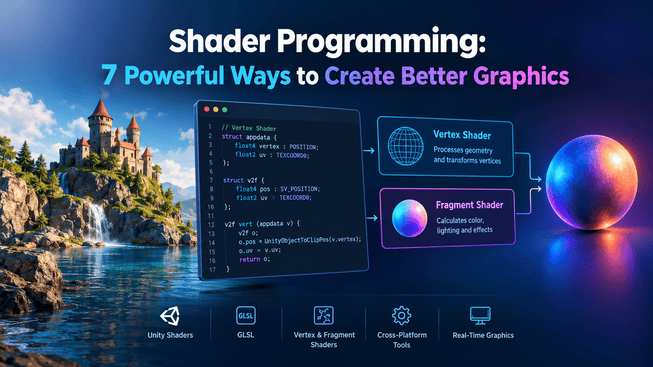
A vertex shader processes individual vertices supplied to the graphics pipeline. A vertex may contain a position, normal, texture coordinates, color, or other attributes.
Common responsibilities include:
- Transforming positions into clip space.
- Passing attributes to subsequent stages.
- Animating vertex positions.
- Deforming geometry for effects such as waves.
For example, a developer can use a vertex shader to adjust the height of a water mesh over time. The resulting geometry can then be combined with a material that adds color, reflections, and lighting.
What does a fragment shader do?
A fragment shader processes fragments produced during rasterization. A fragment represents a potential contribution to the rendered image, although it does not always become a visible final pixel.
Fragment shaders commonly handle:
- Texture sampling.
- Surface color calculations.
- Lighting contributions.
- Material details.
- Outputs used in blending and other rendering operations.
A fragment shader might sample a texture, combine it with a surface color, and calculate lighting to determine the appearance of a character’s armor.
Vertex shader vs pixel shader
The terms fragment shader and pixel shader refer to closely related concepts. OpenGL generally uses fragment shader, while Direct3D commonly uses pixel shader.
| Feature | Vertex shader | Fragment or pixel shader |
| Input | Vertex attributes | Interpolated data and other inputs |
| Main task | Process vertex data | Calculate fragment outputs |
| Typical applications | Geometry transformations and deformation | Texturing, surface color, and lighting |
| Performance considerations | Vertex workload | Fragment workload, texture sampling, and overdraw |
The best way to distribute work depends on the rendering requirements. Moving a calculation between stages can change interpolation, accuracy, and performance, so developers should profile and validate the result.
How to Use Unity Shaders and Shader Graph
Unity supports several approaches to shader development, including visual shader authoring and custom shader code. Developers can select the method that best fits their technical experience and project requirements.
Creating shaders with Shader Graph
Shader Graph lets developers build shaders by connecting nodes representing colors, textures, mathematical operations, coordinates, and material outputs.
A typical workflow involves:
- Creating a compatible Shader Graph asset.
- Adding nodes for the required inputs and calculations.
- Connecting the nodes to define the shader’s behavior.
- Saving the graph and configuring a material.
- Applying the material to an object.
- Testing the result under different lighting conditions.
For example, a developer can combine a texture sample, a color adjustment, and a time-based calculation to create an animated surface.
Shader Graph is useful for prototyping and for teams in which artists need to modify visual effects without manually editing every line of shader code. However, available features depend on the Unity version and render pipeline.
When should developers use custom shader code?
Custom shader code is useful when an effect requires specialized calculations, precise control, or functionality that is difficult to represent with visual nodes.
A practical strategy is to begin with Shader Graph for straightforward materials and prototypes, then introduce custom code when greater control is necessary.
Developers exploring the Unity ecosystem can also read Eduonix’s overview of the Unity game engine and its development capabilities. It provides broader context for Unity’s role in game development, although its older publication date means current feature details should be checked against official Unity documentation.
Cross-Platform Shader Development
Cross-platform shader development means creating and adapting shaders so they work correctly across different graphics APIs, operating systems, game engines, and hardware configurations.
This is particularly important when a game must run on desktop computers, consoles, and mobile devices. Each target may have different capabilities, supported features, and performance limits.
Common shader compatibility problems
Language and API differences: GLSL and HLSL use different syntax and conventions. Engine translation and shader compilation systems can help, but developers should not assume that every feature behaves identically.
Hardware limitations: A complex shader may perform well on a desktop GPU but exceed the performance budget of a mobile device.
Rendering differences: Texture formats, coordinate conventions, depth behavior, blending, and available rendering features may vary between environments.
Unsupported features: Some shader stages, instructions, and advanced effects may not be available on every target.
Building a portable shader workflow
Developers should define target platforms early and select features that are supported across those environments.
Choosing the right game engine is an important part of cross-platform graphics development because each engine offers different rendering capabilities and platform support. Explore this comparison of the top game development engines to understand which environment best suits your project’s graphics and compatibility requirements.
A reliable workflow includes:
- Identifying the graphics APIs and minimum hardware requirements.
- Using engine-supported shader abstractions where appropriate.
- Keeping platform-specific code isolated.
- Creating only necessary shader variants.
- Testing on representative devices throughout development.
- Providing simpler fallback materials for unsupported effects.
Cross-platform compatibility requires more than successful compilation. Developers must also confirm that a shader renders correctly and performs adequately on every supported target.
For additional context on cross-platform development strategies, see CodeCondo’s article on cross-platform development tools and technologies. Although it focuses on mobile application development rather than shader-specific tooling, it offers useful background on the challenges of supporting multiple platforms.
Seven Ways to Improve Shader Performance
Efficient shader programming helps maintain smooth frame rates, reduce GPU workload, and support a wider range of devices. The most reliable approach is to measure performance before making changes.
1. Reduce unnecessary calculations
Avoid repeating calculations when intermediate results can be reused safely. However, modern shader compilers already optimize many expressions, so profiling should guide any manual changes.
2. Optimize texture sampling
Texture lookups can add substantial workload, especially when shaders sample many textures or use complex filtering. Remove unnecessary samples and choose suitable texture resolutions and formats.
3. Reduce expensive fragment processing
Fragment shaders may run for many fragments, including ones that do not contribute to the final visible image. Avoid unnecessary per-fragment calculations, but confirm that moving work to another stage preserves the intended visual result.
4. Choose appropriate precision
Where supported, appropriate precision can help balance performance and numerical accuracy. Test precision changes on target hardware because different GPUs and APIs handle precision differently.
5. Manage shader variants
Excessive variants can increase build size, compilation time, and runtime management overhead. Limit feature combinations to those genuinely required by the project.
6. Reduce geometry complexity and overdraw
Large amounts of overlapping geometry and transparent objects can increase rendering costs. Review particle density, unnecessary geometry, and overlapping effects when profiling identifies these as bottlenecks.
7. Profile on target hardware
Test representative scenes on the devices you intend to support. A change that improves performance on one GPU may have little effect—or a negative effect—on another.
These techniques help developers balance visual quality and performance. The goal is not simply to write shorter shader code, but to meet the project’s graphics requirements within its performance budget.
Debugging and Testing Shader Code
Debugging is a fundamental part of shader programming. Errors can appear as compilation failures, incorrect colors, missing objects, flickering, unexpected lighting, or poor performance.
Common shader programming errors
Common issues include:
- Compilation errors: Unsupported syntax, incorrect data types, or missing declarations.
- Coordinate-space errors: Mixing object, world, view, and clip-space coordinates.
- Normal transformation errors: Incorrect normals producing unexpected lighting.
- Texture-coordinate errors: Incorrect UV values stretching or misplacing textures.
- Platform-specific failures: Features that work on one graphics API but fail on another.
- Performance bottlenecks: Excessive texture sampling, expensive calculations, or overdraw.
A repeatable debugging workflow
Begin with the simplest working version of a shader. For example, output a constant color before introducing textures, lighting, or animation. Add one feature at a time so that failures are easier to isolate.
Next, inspect compilation messages, input data, coordinate spaces, texture settings, and material configuration. Where available, use graphics debugging tools to capture a frame and examine rendering state.
Finally, test under realistic conditions on the intended platforms. Include different lighting environments, camera angles, scene complexity levels, and hardware configurations.
Shader testing checklist
Before release, confirm that:
- The shader compiles for the required graphics APIs.
- Its output matches the visual design.
- It handles expected textures and material inputs.
- Its performance meets the target frame budget.
- Unsupported features have appropriate fallbacks.
- Its behavior is consistent across representative devices.
A disciplined testing process helps prevent visual inconsistencies and costly last-minute fixes.
Frequently Asked Questions About Shader Programming
What is shader programming used for?
Shader programming controls rendering tasks such as geometry transformation, lighting, texturing, materials, and visual effects. It is used in games, simulations, interactive applications, and real-time 3D graphics.
Which shader programming language should beginners learn?
GLSL is a useful starting point for learning programmable OpenGL graphics. HLSL is relevant to Direct3D-oriented workflows. Unity developers can also begin with Shader Graph before progressing to custom shader code.
What is the difference between a vertex shader and a fragment shader?
A vertex shader processes vertex data and often transforms geometry positions. A fragment shader calculates outputs for fragments, including surface colors and lighting. Their exact roles depend on the graphics pipeline.
Are Unity shaders cross-platform?
Unity supports shader workflows for multiple platforms, but compatibility depends on the render pipeline, shader features, graphics API, and target hardware. Testing and fallback materials remain important.
How can developers optimize shader performance?
Developers should profile shaders on target hardware and investigate unnecessary texture samples, repeated calculations, expensive fragment processing, excessive shader variants, and overdraw. Each optimization should be tested for both performance and visual quality.
Conclusion: Building Better Graphics with Shader Programming
Shader programming gives graphics developers control over how interactive environments look and behave. Understanding the rendering pipeline, learning the differences between vertex and fragment shaders, and choosing suitable languages and tools provide a strong foundation for creating better real-time graphics.
Unity shaders and Shader Graph make shader creation more accessible, while GLSL and other shader programming languages offer control over specialized rendering tasks. Cross-platform development adds another responsibility: ensuring shaders compile, render correctly, and perform well on all supported devices.
The most effective approach combines solid fundamentals, incremental development, debugging, and measurement on real hardware. Start with a simple shader, add features gradually, and test each change. This workflow helps produce graphics that are more reliable, maintainable, and efficient across modern game development platforms.