In today’s fast-evolving digital landscape, choosing between static vs dynamic websites is one of the most important decisions you’ll make for your online presence. In the context of SEO in 2026, it’s no longer just about having a website—it’s about how fast it loads, how well it scales, and how effectively it delivers a seamless user experience.
Modern users expect instant page loads and personalized interactions. In fact, studies show that a 1-second delay in page load time can reduce conversions by up to 7%, while fast-loading pages significantly improve engagement and search rankings. This is where the debate around static vs dynamic websites becomes critical—because your website architecture directly impacts performance, scalability, and UX.
At the same time, the rise of interactive and personalized web experiences has changed user expectations. Over 70% of users now expect personalized content based on their behavior, location, or preferences—something that dynamic websites are designed to deliver. However, static websites continue to dominate in areas like speed, security, and cost-efficiency.
Despite this, there’s still widespread confusion around what static vs dynamic websites actually mean and how they differ from modern web applications. To understand this better, it also helps to explore the difference between a website and web application, which often overlaps with these concepts:
- What is a static website?
- What is a dynamic website?
- Which one is better for SEO and long-term growth?
Understanding the difference between static and dynamic websites is essential if you want to build a site that not only ranks well but also scales with your business.
In this complete guide, you’ll learn:
- Clear, beginner-friendly definitions
- How static and dynamic websites work
- A side-by-side comparison of key features
- Real-world examples and use cases
- A practical decision framework to choose the right option
By the end, you’ll have a clear understanding of which approach aligns best with your goals in today’s performance-driven, user-focused web ecosystem.

What is a Static Website?
When exploring static vs dynamic websites, understanding what a static website is the first step. A static website is one of the simplest forms of web architecture, designed to deliver the same content to every visitor. While modern web experiences are becoming more interactive and data-driven, static websites remain highly relevant due to their speed, reliability, and cost-effectiveness.
Definition (Fixed Content, Same for All Users)
A static website consists of fixed web pages that display identical content to every user, regardless of their behavior, location, or device. This is a core aspect of the static vs dynamic website difference, where static sites do not adapt or personalize content in real time.
In a static vs dynamic website, in simple words, a static website works like a digital brochure—what you publish is exactly what every visitor sees. There is no variation unless a developer manually updates the content.
Examples of static websites include:
- Personal portfolio websites
- Resume websites
- Business brochure sites
- Landing pages for campaigns
These static and dynamic website examples highlight that static sites are best suited for content that doesn’t change frequently.
Technologies Used (HTML, CSS, JS)
Static websites are built using fundamental front-end technologies like HTML, CSS, and JavaScript basics :
- HTML (HyperText Markup Language): Structures the content (text, images, links)
- CSS (Cascading Style Sheets): Controls design, layout, and responsiveness
- JavaScript: Adds basic interactivity, like animations or form validation
These technologies run entirely on the client side (in the user’s browser), which is a major point in the static vs dynamic websites comparison. Unlike dynamic websites that rely on server-side languages and databases, static sites do not require backend processing.
This simplicity makes static websites:
- Easier to develop
- Faster to deploy
- Less dependent on complex infrastructure
How Static Websites Work (Pre-rendered Pages)
Static websites operate using pre-rendered HTML files stored on a web server. When a user visits a page, the server simply delivers the already-built file without modifying it.
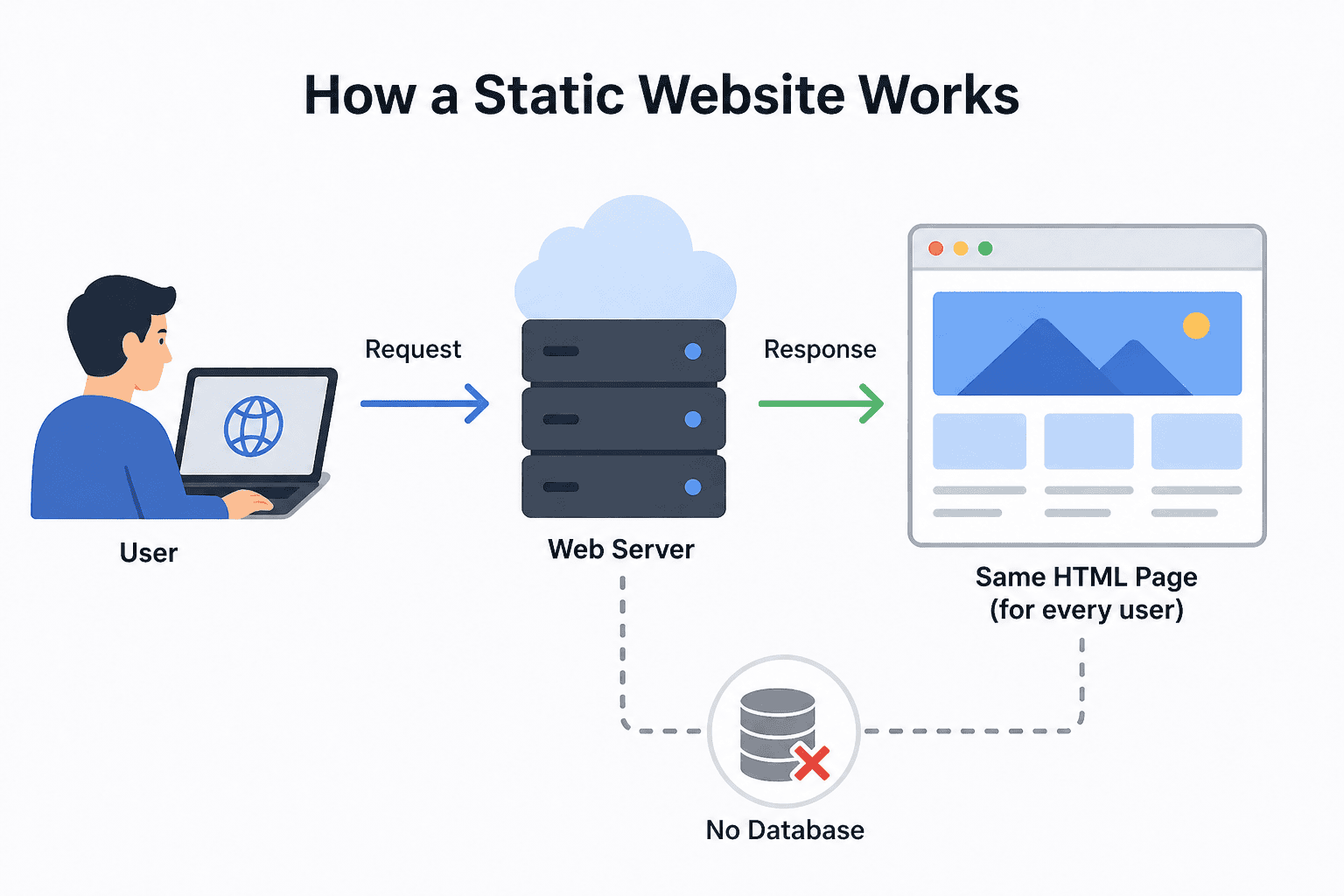
Here’s how the process works:
- A user enters a URL in their browser
- The browser sends a request to the server
- The server returns a fixed HTML file
- The browser displays the page exactly as stored
This process explains a key part of the difference between static and dynamic website with examples—static sites don’t generate content on demand, while dynamic sites build pages in real time using databases and server-side code.
Because of this pre-rendered approach, static websites offer:
- Extremely fast loading speeds
- Minimal server processing
- High reliability
Key Characteristics (Fast, Simple, No Database)
Static websites are defined by a set of core characteristics that make them unique in the static vs dynamic websites debate:
Key features:
- Fast performance: No database queries or server-side rendering
- High security: Fewer vulnerabilities due to no backend systems
- Low cost: Affordable hosting and minimal infrastructure
- Simplicity: Easy to build and maintain for small projects
- No database dependency: Content is stored directly in files
When analyzing static website advantages and disadvantages, these strengths stand out. However, there are also limitations:
- No built-in personalization
- Manual updates required for content changes
- Limited advanced functionality
This is where dynamic website features (like user logins, real-time updates, and personalization) start to outperform static sites in more complex use cases.
Understanding what a static website provides a strong foundation for comparing it with dynamic systems. In the next section, we’ll explore what a dynamic website is and how it powers modern, interactive digital experiences in today’s evolving web ecosystem.
What is a Dynamic Website?
After understanding what a static website is, the next step in the static vs dynamic websites comparison is to explore what a dynamic website is and why it powers most modern digital platforms. A dynamic website is designed to deliver flexible, data-driven content that can change based on user behavior, preferences, or real-time inputs—making it essential for today’s interactive web experiences.
Definition (Content Changes Based on User/Data)
A dynamic website is a type of website where content is generated in real time and can vary from one user to another. Unlike static sites that show fixed pages, dynamic sites adapt content based on factors like user location, device, past behavior, or preferences.
This is a major part of the static vs dynamic website difference, as dynamic websites enable personalization and real-time updates. In static vs dynamic website in simple words, a dynamic website is like a smart assistant—it changes what it shows depending on who you are and what you need.
Common examples of dynamic websites include:
- E-commerce platforms (Amazon, eBay)
- Social media sites (Facebook, Instagram)
- News and blogging platforms
- Membership or learning platforms
These static and dynamic website examples clearly show how dynamic sites dominate use cases that require frequent updates and user interaction.
Technologies Used (PHP, Python, CMS, Databases)
Dynamic websites rely on a combination of front-end and back-end technologies to function effectively. While they still use HTML, CSS, and JavaScript for the user interface, the real power comes from server-side technologies.
Key technologies include:
- Server-side languages: PHP, Python, Ruby, Node.js—each used to build dynamic logic and handle user requests. If you’re comparing options, understanding the differences between Python vs JavaScript can help you choose the right backend technology
- Databases: MySQL, PostgreSQL, MongoDB
- Content Management Systems (CMS): WordPress, Drupal, Joomla
- APIs & integrations: For payments, analytics, and third-party services In the static vs dynamic websites discussion, this tech stack is what enables advanced dynamic website features like user authentication, content management, and automation. However, it also adds complexity compared to static websites.
How Dynamic Websites Work (Server-Side Processing)
Dynamic websites generate pages on demand using server-side processing. Instead of serving a pre-built file, the server creates a page dynamically whenever a user makes a request.

Here’s how it works:
- A user requests a webpage via a browser
- The server processes the request using server-side code
- The system fetches relevant data from a database
- The server builds a custom HTML page
- The final page is delivered to the user’s browser
This process explains the difference between static and dynamic website with examples—while static sites serve ready-made pages, dynamic websites build them “on the fly.”
Although this adds slight overhead in performance, it allows for real-time updates, making dynamic websites ideal for content-heavy and interactive platforms.
Key Characteristics (Interactive, Personalized, Scalable)
Dynamic websites are defined by their flexibility and advanced functionality, making them a preferred choice in modern web development.
Key characteristics include:
- Interactivity: Supports forms, user accounts, dashboards, and real-time features
- Personalization: Content adapts based on user data and behavior
- Scalability: Easily handles large amounts of content and traffic
- Easy content management: Updates can be made through a CMS without coding
- Integration capabilities: Connects with APIs, tools, and third-party services
When comparing static website advantages and disadvantages with dynamic website advantages, it becomes clear that dynamic sites excel in functionality and user experience. However, they may require higher development costs, ongoing maintenance, and performance optimization.
Understanding what a dynamic website is completes the foundation of the static vs dynamic websites comparison. With both concepts clear, it becomes much easier to evaluate use cases, performance trade-offs, and choose the right approach for your website goals.
Static vs Dynamic Websites: Key Differences
Understanding the static vs dynamic website difference is crucial when deciding which type of website suits your goals. While both ultimately deliver HTML pages to a user’s browser, the way they generate and serve that content is fundamentally different—and that impacts performance, scalability, user experience, and even SEO.
In static vs dynamic websites, the choice often comes down to simplicity vs functionality. Static websites prioritize speed, security, and low cost, while dynamic websites focus on interactivity, personalization, and scalability. Below is a clear, side-by-side comparison to help you quickly evaluate both options.
Static vs Dynamic Website Comparison Table

| Feature | Static Website | Dynamic Website |
| Content | Fixed (same for all users) | Changes dynamically based on user/data |
| Speed | Very fast (no server processing) | Slower (depends on optimization & server load) |
| Development | Simple (HTML, CSS, JS) | Complex (server-side languages, databases) |
| Cost | Low (cheap hosting & maintenance) | Higher (development + ongoing maintenance) |
| Security | More secure (no database/backend) | More vulnerable (if not properly managed) |
| Scalability | Limited for complex features | Highly scalable for large applications |
| Interactivity | Minimal (basic JS only) | High (user accounts, real-time features) |
| Use Cases | Portfolio, landing pages, brochure sites | e-commerce, SaaS, blogs, social platforms |
Key Takeaways
The difference between static and dynamic websites with examples becomes clearer when you look at real-world usage. A portfolio site or simple business page works perfectly as a static website because it doesn’t need constant updates or user interaction. On the other hand, platforms like online stores, blogs, or membership sites rely heavily on dynamic website features such as user logins, content updates, and personalization.
In static vs dynamic website in simple words, static sites are best for “read-only” experiences, while dynamic sites are built for “interactive and evolving” experiences.
If your priority is speed, affordability, and security, static websites are a strong choice. But if you need flexibility, scalability, and advanced functionality, the dynamic website advantages make it the better long-term solution.
Static Website Advantages and Disadvantages
When analyzing static vs dynamic websites, it’s important to look beyond definitions and understand the real-world strengths and limitations of each. While static sites are known for their simplicity and performance, they may not always meet the needs of modern, feature-rich platforms.
Below is a detailed breakdown of the advantages and disadvantages to help you make an informed decision.
Advantages of Static Websites
1. Faster Load Times
One of the biggest advantages of static websites is their exceptional speed. Since pages are pre-rendered and stored as simple HTML files, the server doesn’t need to process requests or query databases before delivering content.
This makes static sites significantly faster compared to dynamic ones, especially in the static vs dynamic website difference discussion. Faster load times directly improve user experience and can positively impact SEO rankings. In static vs dynamic website in simple words, static sites are “ready-to-serve,” which eliminates delays caused by backend processing.
2. Better Security (No Database)
Static websites are inherently more secure because they don’t rely on databases or server-side scripts. This means there are fewer entry points for cyberattacks such as SQL injections or server exploits.
In the context of static vs dynamic websites, this is a major advantage over systems that depend on backend infrastructure. Since there’s no user data processing or complex logic happening on the server, the overall attack surface is minimal. This makes static sites ideal for projects where security is a top priority.
3. Lower Hosting Cost
Another key benefit highlighted in the advantages and disadvantages of static websites is cost efficiency. Static websites require minimal server resources because they only serve fixed files, which reduces hosting expenses.
You can even host static sites on low-cost or free platforms like CDN-based services. Compared to dynamic sites—which need databases, server-side processing, and ongoing maintenance—static sites are far more budget-friendly. This is especially useful for small businesses, startups, or personal projects.
4. Easy to Deploy
Deploying a static website is straightforward and quick. Since there’s no backend setup, developers can simply upload files to a server or use modern deployment platforms for instant publishing.
This simplicity is a key part of the difference between static and dynamic website with examples, where dynamic sites often require server configuration, database setup, and CMS installation. Static sites eliminate these complexities, making them easier to manage in smaller projects or by individual developers.
Disadvantages of Static Websites
1. Hard to Update (Manual Changes)
One of the biggest limitations of static websites is that updates must be made manually. If you want to change content, you need to edit the HTML files and re-upload them to the server.
As the website grows, this process becomes time-consuming and inefficient. In contrast, when you understand what a dynamic website is, you’ll notice that dynamic platforms allow content updates through a CMS with just a few clicks. This highlights a clear static vs dynamic website difference in terms of content management.
2. Limited Functionality
Static websites lack advanced dynamic website features such as user authentication, real-time updates, personalized content, and database-driven functionality.
This makes them unsuitable for complex applications like eCommerce stores, membership platforms, or SaaS products. While you can add some interactivity using JavaScript, it doesn’t match the flexibility offered by dynamic systems. This limitation becomes clear when comparing static and dynamic website examples, like a portfolio site vs an online marketplace.
3. Not Scalable for Large Sites
While static websites perform well for small projects, they can become difficult to manage at scale. Handling hundreds or thousands of pages manually is not practical without additional tools like static site generators.
In the static vs dynamic website comparison table, scalability is a key factor where dynamic websites often have the upper hand. Dynamic systems can efficiently manage large volumes of content using databases, making them more suitable for growing businesses and content-heavy platforms.
Dynamic Website Advantages and Disadvantages
In the static vs dynamic websites comparison, dynamic websites stand out for their flexibility, interactivity, and ability to scale with modern business needs. After understanding what a dynamic website is, it’s important to evaluate its real-world pros and cons to determine whether it fits your project requirements.
Below is a detailed breakdown of the dynamic website’s advantages and limitations.
Advantages of Dynamic Websites
1. Personalized User Experience
One of the biggest strengths of dynamic websites is their ability to deliver personalized content. Unlike static sites that show the same information to everyone, dynamic platforms adapt based on user behavior, preferences, location, or past interactions.
This is a defining point in the static vs dynamic website difference, where dynamic websites provide tailored experiences—like product recommendations, personalized dashboards, or curated content feeds. These advanced dynamic website features significantly improve user engagement and retention, making them essential for modern digital platforms.
2. Easy Content Updates (CMS)
Dynamic websites make content management simple and efficient through Content Management Systems (CMS) like WordPress or Drupal. Instead of manually editing code, users can update text, images, or pages directly from an admin dashboard.
When comparing the difference between static and dynamic website with examples, this is a major advantage. For instance, updating a blog post on a dynamic site takes minutes, while a static site may require manual file edits and redeployment. This ease of use is especially beneficial for non-technical users and growing teams.
3. High Scalability
Dynamic websites are built to handle growth. Whether you’re adding new pages, users, or features, dynamic systems can scale efficiently using databases and server-side technologies.
In the static vs dynamic website comparison table, scalability is where dynamic websites clearly outperform static ones. Large platforms like eCommerce stores, SaaS applications, and news portals rely on dynamic architecture to manage massive amounts of content and traffic without breaking performance.
4. Rich Functionality
Dynamic websites support a wide range of advanced features that are not possible with static sites alone. These include:
- User login and authentication systems
- Shopping carts and payment gateways
- Real-time data updates
- Search functionality
- API integrations and automation
These dynamic website advantages make them ideal for complex use cases. When looking at static and dynamic website examples, platforms like Amazon or social media apps clearly demonstrate how dynamic functionality enhances user experience and business capabilities.
Disadvantages of Dynamic Websites
1. Slower Performance (If Not Optimized)
Because dynamic websites rely on server-side processing and database queries, they can be slower than static websites if not properly optimized. Each request may involve multiple steps before the final page is delivered.
In the static vs dynamic websites debate, this is a common trade-off—dynamic sites offer more functionality but may require performance optimization techniques like caching, CDNs, and efficient database queries to maintain speed.
2. Higher Development Cost
Dynamic websites are more complex to build, which increases development costs. They require backend development, database setup, and often integration with third-party tools or APIs.
Compared to static sites, this adds both initial and ongoing expenses. This cost difference is a key part of the static vs dynamic website difference, especially for startups or small projects with limited budgets.
3. More Security Risks
Dynamic websites have a larger attack surface because they involve databases, server-side scripts, and user data processing. Without proper security measures, they can be vulnerable to threats like SQL injection, cross-site scripting (XSS), and data breaches.
While modern frameworks and best practices can mitigate these risks, security remains a critical consideration in static vs dynamic websites. This is where static sites often have an edge due to their minimal backend exposure.
4. Requires Maintenance
Dynamic websites require ongoing maintenance to function smoothly. This includes:
- Regular CMS and plugin updates
- Database optimization
- Security patches
- Performance monitoring
Unlike static sites, which can run with minimal intervention, dynamic platforms need continuous management. Understanding what is static website vs dynamic highlights this difference clearly—dynamic sites offer flexibility but demand consistent upkeep.
Static vs Dynamic Website Examples
To fully understand the static vs dynamic website difference, it helps to look at real-world static and dynamic website examples. These examples show how each type of website is used in practical scenarios and why one may be preferred over the other depending on the goal.

Static Website Examples
Static websites are best suited for simple, fixed-content use cases where information doesn’t need frequent updates or user interaction.
Common static website examples include:
- Portfolio websites: Designers, developers, and freelancers use static sites to showcase their work, skills, and contact details without needing constant updates.
- Business landing pages: Small businesses often use static pages to highlight services, pricing, and contact information in a clean and fast-loading format.
- Documentation sites: Technical documentation or help pages are often built as static websites because the content remains relatively stable and benefits from fast performance.
These examples clearly reflect what is static website—a fast, secure, and straightforward solution for delivering the same content to every visitor.
Dynamic Website Examples
Dynamic websites are designed for platforms that require frequent updates, interactivity, and personalized user experiences.
Popular dynamic website examples include:
- Amazon (eCommerce): Displays personalized product recommendations, dynamic pricing, and user-specific content based on browsing behavior.
- Facebook / Instagram (Social Media): Every user sees a unique feed generated in real time based on interactions, preferences, and connections.
- News websites: Platforms like news portals update content continuously, showing the latest articles, trends, and sometimes personalized recommendations.
These examples highlight what is a dynamic website, and demonstrate how advanced dynamic website features enable scalability, personalization, and real-time content delivery.
In the context of static vs dynamic websites, these examples make it clear: static sites are ideal for simple, informational purposes, while dynamic sites power complex, interactive platforms.
Static vs Dynamic Websites in Simple Words
For beginners trying to understand static vs dynamic websites in simple words, the easiest way is to compare them with everyday experiences.
- Static website = like a printed brochure
It shows the same information to everyone. Nothing changes unless someone manually updates it. - Dynamic website = like a personalized app
It adapts to each user, showing different content based on preferences, behavior, or real-time data.
This simple explanation captures the core difference between static and dynamic websites with examples without getting into technical complexity.
In short, within the static vs dynamic websites comparison:
- Static = simple, fixed, and fast
- Dynamic = interactive, flexible, and personalized
This distinction helps beginners quickly decide which type of website aligns with their needs.
How to Choose Between Static vs Dynamic Websites?
Choosing between static vs dynamic websites isn’t just a technical decision—it directly impacts your site’s performance, scalability, user experience, and long-term growth. After understanding what is static website and what is dynamic website, the next step is to evaluate your specific needs.
Below is a practical decision framework to help you choose the right approach based on real-world factors.
1. Based on Purpose
Your website’s primary goal is the most important factor in deciding between static and dynamic.
- Informational → Static Website
If your goal is to present fixed information—like company details, services, or a portfolio—a static site is often enough. These sites work well for “read-only” experiences where users don’t need to interact beyond basic navigation. - Interactive / Transactional → Dynamic Website
If your website involves user interaction—such as purchases, registrations, or dashboards—you’ll need dynamic functionality. These use cases rely heavily on dynamic website features like user accounts, real-time processing, and personalized content.
In the static vs dynamic website difference, purpose often becomes the deciding factor: static for simplicity, dynamic for functionality.
2. Based on Content Updates
How often your content changes plays a major role in your decision.
- Rare Updates → Static Website
If your content stays mostly the same (e.g., portfolios, landing pages), static websites are efficient and easy to manage. You won’t need frequent updates, so manual changes won’t be a burden. - Frequent Updates → Dynamic Website
If you regularly publish content—like blogs, news, or product listings—a dynamic website is more practical. With a CMS, updates can be made instantly without editing code.
This is a key part of the difference between static and dynamic websites, with examples—a documentation site vs a news portal clearly illustrates this contrast.
3. Based on the Budget
Budget constraints can significantly influence your choice in the static vs dynamic websites comparison.
- Low Budget → Static Website
Static sites are cost-effective. They require minimal hosting resources and are quicker to build, making them ideal for individuals, startups, or small businesses. - Flexible Budget → Dynamic Website
Dynamic websites involve higher upfront development costs and ongoing expenses for maintenance, hosting, and updates. However, they provide more long-term value for complex projects.
When evaluating static website advantages and disadvantages, cost is one of the biggest advantages of going static.
4. Based on Features Needed
The features you need will quickly determine whether static or dynamic is the right fit.
- No Login / Forms → Static Website
If your website doesn’t require user accounts, payments, or advanced interactivity, a static setup is sufficient. Basic forms can still be integrated using third-party tools if needed. - Login, Payments, Dashboards → Dynamic Website
Features like authentication, shopping carts, user dashboards, and real-time data require backend processing. These are core dynamic website features that static sites cannot handle natively.
This is where dynamic website advantages clearly outweigh static limitations in feature-rich environments.
5. Based on Scalability Needs
Think long-term—how much do you expect your website to grow?
- Small Site → Static Website
For small websites with limited pages and traffic, static sites are easy to manage and perform exceptionally well. - Growing Platform → Dynamic Website
If you plan to scale—adding users, content, or features—dynamic websites are better equipped. They use databases and server-side logic to handle growth efficiently.
In most static vs dynamic website comparison tables, scalability is where dynamic websites have a clear advantage.
Key Consideration: Hybrid Approach
In modern web development, many businesses are adopting a hybrid website vs static vs dynamic approach. This combines the speed of static pages with the flexibility of dynamic features.
For example:
- Static front-end for performance
- Dynamic backend for user data and personalization
This approach offers the best of both worlds, especially for SEO and performance-focused projects in today’s web landscape.
Final Thoughts
There’s no one-size-fits-all answer in the static vs dynamic websites debate. The right choice depends on your goals, resources, and future plans.
- Choose static if you want speed, simplicity, and low cost
- Choose dynamic if you need scalability, interactivity, and advanced features
By aligning your decision with purpose, budget, features, and growth expectations, you can build a website that not only performs well today but also scales effectively in the future.
What is a Hybrid Website? (Best of Both Worlds)

As the debate around static vs dynamic websites evolves, a third approach has gained massive popularity—hybrid websites. These combine the speed of static sites with the flexibility of dynamic systems, making them highly relevant in the context of SEO in 2026 and modern web performance standards.
If you’ve been comparing what is static website and what is dynamic website, a hybrid model offers a practical middle ground—especially for businesses that want both performance and advanced functionality.
Definition (Mix of Static + Dynamic)
A hybrid website is a web architecture that blends static and dynamic elements into a single system. Instead of choosing one approach entirely, hybrid sites pre-render some pages (like static websites) while generating others dynamically when needed.
This model directly addresses the static vs dynamic website difference by combining the strengths of both:
- Static components for speed and SEO
- Dynamic components for personalization and interactivity
In static vs dynamic website in simple words, a hybrid website is like a fast-loading app that can still adapt and respond to users in real time.
Examples (Next.js, JAMstack Sites)
Modern frameworks and architectures have made hybrid websites more accessible and powerful.
Popular hybrid website examples include:
- Next.js websites: Use Static Site Generation (SSG) for pre-built pages and Server-Side Rendering (SSR) for dynamic content
- JAMstack sites: Combine JavaScript, APIs, and Markup to deliver static frontends with dynamic backend functionality
- Headless CMS setups: Content is managed dynamically but delivered as fast static pages
These static and dynamic website examples show how developers are moving beyond traditional models to build high-performance, scalable platforms.
Benefits (Speed + Flexibility)
Hybrid websites bring together the key dynamic website advantages and static performance benefits.
Key benefits include:
- Faster load times: Static pages are pre-rendered and served via CDNs, improving Core Web Vitals and SEO rankings
- Better SEO performance: Search engines favor fast, stable, and well-structured pages—hybrid sites excel in all three
- Dynamic functionality: Features like user logins, dashboards, and real-time updates are still possible
- Improved scalability: Static assets handle traffic spikes, while dynamic components manage complex operations
- Enhanced user experience (UX): Combines speed with personalization for modern web expectations
In the static vs dynamic websites comparison, hybrid architecture often outperforms both when implemented correctly—especially for content-heavy and high-traffic platforms.
When to Use Hybrid Approach
A hybrid approach is ideal when your website needs both performance and functionality.
Use a hybrid website when:
- You want SEO-optimized pages that load instantly
- Your site includes both static content (blogs, landing pages) and dynamic features (user accounts, dashboards)
- You expect high traffic and need better scalability
- You want to balance cost, performance, and flexibility
- You’re building modern platforms like SaaS, marketplaces, or content-driven websites such as a WordPress-based niche blog or content site.
For example, a blog homepage can be statically generated for speed, while user-specific dashboards remain dynamic—this is a perfect difference between static and dynamic website with examples applied in a real scenario.
Additional Insights for SEO & Modern Web (2026)
In SEO in 2026, performance, user experience, and scalability are critical ranking factors. Hybrid websites align perfectly with these priorities:
- Core Web Vitals optimization: Faster Largest Contentful Paint (LCP) through static delivery
- Crawl efficiency: Pre-rendered pages are easier for search engines to index
- Reduced server load: Improves uptime and reliability
- Edge delivery (CDN): Content is served closer to users, enhancing global performance
This is why many modern websites are shifting toward hybrid architectures instead of choosing strictly between static or dynamic.
Static vs Dynamic Websites for SEO (2026)
When evaluating static vs dynamic websites in the context of SEO in 2026, the conversation goes far beyond just keywords. Search engines now prioritize user experience, speed, and content accessibility, making your website architecture a critical ranking factor. Understanding the static vs dynamic website difference from an SEO perspective helps you make smarter decisions that directly impact visibility, traffic, and conversions.
Page Speed Impact (Core Web Vitals)

Page speed remains one of the strongest ranking signals, especially with Google’s Core Web Vitals playing a central role in SEO performance.
- Static websites are inherently faster because they serve pre-rendered HTML files without needing server-side processing. This leads to:
- Faster Largest Contentful Paint (LCP)
- Lower Time to First Byte (TTFB)
- Better overall user experience
- Dynamic websites, on the other hand, generate pages in real time. This can slow down performance if not optimized properly, especially when:
- Multiple database queries are involved
- Heavy scripts or plugins are used
However, modern optimization techniques (caching, CDNs, lazy loading) have significantly reduced this gap. So while static vs dynamic website difference in speed still exists, it’s no longer a dealbreaker if dynamic sites are well-optimized.
Crawlability and Indexing
Search engines need to crawl and index your content efficiently, and this is where structure matters.
- Static websites are extremely crawl-friendly because:
- Content is fixed and easily accessible
- URLs are clean and predictable
- No rendering delays
- Dynamic websites may face challenges if:
- Content relies heavily on JavaScript
- Pages are generated dynamically without proper internal linking
- Poor URL structures or duplicate content issues exist
That said, most modern CMS platforms (like WordPress) are SEO-optimized, making dynamic websites just as indexable when configured correctly.
Dynamic Rendering Challenges
One of the key concerns in what is dynamic website from an SEO perspective is rendering.
Dynamic websites often rely on:
- JavaScript frameworks
- Client-side rendering
- API-based content loading
This can create issues like:
- Search engines not seeing full content immediately
- Delayed indexing
- Inconsistent rendering across devices
Solutions include:
- Server-side rendering (SSR)
- Static site generation (SSG)
- Hybrid approaches (e.g., Next.js)
These approaches help bridge the gap in the difference between static and dynamic website with examples, ensuring content is both dynamic and SEO-friendly.
Role of CDNs and Edge Delivery
In 2026, Content Delivery Networks (CDNs) and edge computing play a massive role in SEO performance.
- Static websites benefit greatly from CDNs:
- Files are cached globally
- Ultra-fast delivery regardless of user location
- Minimal server load
- Dynamic websites also leverage CDNs, but with more complexity:
- Dynamic caching strategies
- Edge functions to personalize content
- API acceleration
Modern architectures (like JAMstack and hybrid setups) combine static delivery with dynamic functionality, improving both performance and scalability.
Which is Better for SEO? (Balanced Answer)
There’s no one-size-fits-all answer in the static vs dynamic websites debate for SEO.
Static websites are better for SEO when:
- You prioritize speed and performance
- Content doesn’t change frequently
- You want simple, highly crawlable pages
Dynamic websites are better for SEO when:
- You need frequent content updates (blogs, news, eCommerce)
- Personalization improves user experience
- You’re scaling content (hundreds or thousands of pages)
The Reality in 2026
The real winner isn’t purely static or dynamic—it’s optimized architecture.
- A poorly optimized static site can still rank lower
- A well-optimized dynamic site can dominate SERPs
That’s why modern SEO strategies often lean toward hybrid approaches, combining:
- Static speed
- Dynamic flexibility
- Smart caching and rendering
Use Cases: When to Use Static vs Dynamic Websites

Choosing between static vs dynamic websites isn’t just a technical decision—it directly impacts your site’s performance, scalability, user experience, and long-term SEO success. By understanding the static vs dynamic website difference and aligning it with your goals, you can avoid unnecessary complexity and build a site that actually performs.
Below is a practical breakdown of when each approach works best, along with real-world context and strategic insights.
Use Static Websites For
Static websites are ideal when simplicity, speed, and cost-efficiency matter more than interactivity. If your content doesn’t change often and you don’t need advanced functionality, a static approach is usually the smarter choice.
1. Personal Portfolios
If you’re showcasing your work, resume, or projects, a static site is more than enough. These sites typically have fixed content and don’t require user interaction beyond navigation.
- Fast loading improves first impressions
- Easy to host and maintain
- Great example in static and dynamic website examples
2. Startup Landing Pages
Early-stage startups often need a quick, high-performing landing page to validate ideas or collect leads.
- Static pages load extremely fast, improving conversions
- Minimal development cost
- Easy deployment via CDN for global reach
3. Small Business Websites
Local businesses (cafes, agencies, service providers) often just need basic information like services, contact details, and location.
- No need for complex backend systems
- Lower hosting and maintenance cost
- Fits well within static website advantages and disadvantages discussion
4. Documentation Sites
Technical documentation or help guides are usually content-heavy but not interaction-heavy.
- Pre-rendered pages improve readability and SEO
- Easy to scale using static site generators
- Excellent crawlability for search engines
In static vs dynamic website in simple words, static sites are like a “digital brochure”—simple, fast, and consistent.
Use Dynamic Websites For
Dynamic websites are essential when your project requires interactivity, personalization, or frequent updates. This is where what is dynamic website becomes crucial for modern digital experiences.
1. eCommerce Stores
Online stores require real-time data handling (products, pricing, inventory, user sessions).
- Dynamic content updates instantly
- Supports payments, carts, and user accounts
- A classic example in difference between static and dynamic website with examples
2. SaaS Platforms
Software-as-a-Service platforms rely heavily on user interaction, dashboards, and real-time processing.
- Requires databases and server-side logic
- High scalability for growing user bases
- Strong alignment with dynamic website features
3. Blogs with Frequent Updates
If you publish content regularly, a dynamic CMS (like WordPress) makes content management much easier.
- Easy publishing and editing
- SEO-friendly structure with plugins and automation
- Better suited for content scaling
4. Membership Sites
Websites with login systems, user dashboards, or restricted content must be dynamic.
- Personalized user experiences
- Secure authentication systems
- Real-time data handling
In the static vs dynamic website comparison table, these use cases clearly fall under dynamic due to their complexity and functionality needs.
Common Mistakes to Avoid
Even after understanding static vs dynamic websites, many website owners make decisions that hurt performance, SEO, or scalability. Here are the most common pitfalls—and how to avoid them.
1. Choosing Dynamic When Static Is Enough
One of the biggest mistakes is overengineering a simple website.
- Using a dynamic CMS for a basic 5-page site adds unnecessary complexity
- Increases cost, maintenance, and security risks
- Slows down performance without real benefit
If your site doesn’t need dynamic website features, stick with static.
2. Ignoring Scalability Needs
On the flip side, choosing static for a project that will grow can create problems later.
- Static sites become difficult to manage at scale
- Manual updates become inefficient
- Limited flexibility for future features
This is where understanding hybrid website vs static vs dynamic becomes important—you may need a scalable solution from day one.
3. Not Optimizing Dynamic Site Performance
Dynamic websites are powerful, but they can easily become slow if not optimized.
Common issues:
- Excessive plugins or scripts
- Poor database queries
- Lack of caching or CDN usage
Even though the static vs dynamic website difference includes speed, modern optimization can make dynamic sites just as fast—if done correctly.
4. Overcomplicating Simple Websites
Many developers and businesses add features “just in case,” leading to bloated websites.
- Unnecessary integrations
- Complex backend systems
- Confusing user experience
Always align features with actual user needs, not assumptions.
5. Ignoring SEO Implications
Your choice between static vs dynamic websites directly affects SEO.
- Static sites: excellent speed and crawlability
- Dynamic sites: better for content scaling and keyword targeting
Mistakes include:
- Poor URL structures
- Duplicate content in dynamic sites
- Ignoring Core Web Vitals
A balanced approach (or hybrid model) often delivers the best SEO results in 2026.
Final Takeaway
The decision between static vs dynamic websites should always be based on:
- Your website’s purpose
- Content update frequency
- Required features
- Long-term scalability
There’s no universal “best” option—only the right fit for your use case. The smartest approach is to evaluate the difference between static and dynamic website with examples, avoid common mistakes, and choose a structure that supports both your current needs and future growth.
Future Trends (2026): Static vs Dynamic Websites Evolution
The debate around static vs dynamic websites is rapidly evolving as modern technologies blur the line between the two. In 2026, it’s no longer just about choosing one approach—it’s about leveraging the right architecture to deliver speed, scalability, and personalized user experiences. Understanding these trends will help you stay ahead of the curve and make smarter decisions based on the real static vs dynamic website difference in today’s web ecosystem.
Rise of JAMstack & Headless CMS
One of the biggest shifts in static vs dynamic websites is the rise of JAMstack (JavaScript, APIs, Markup) and headless CMS solutions.
- JAMstack focuses on pre-rendered static pages combined with dynamic functionality via APIs
- Headless CMS separates the content backend from the frontend, allowing flexibility in how content is delivered
This approach combines the best of both worlds:
- Static speed and security
- Dynamic flexibility through APIs
In the context of hybrid website vs static vs dynamic, JAMstack is a perfect example of how modern websites are no longer strictly one or the other.
Why it matters:
- Faster load times improve SEO rankings
- Easier scalability for content-heavy sites
- Better developer experience and flexibility
Serverless Architecture
Serverless is redefining how what is dynamic website is understood in modern development.
Instead of managing servers, developers rely on cloud providers to execute backend functions only when needed.
- No constant server running
- Pay-as-you-go infrastructure
- Automatic scaling
Impact on static vs dynamic website difference:
- Dynamic functionality becomes lighter and more efficient
- Reduces the traditional cost and complexity of dynamic websites
- Makes dynamic features accessible even for smaller projects
This trend minimizes one of the biggest drawbacks highlighted in static website advantages and disadvantages vs dynamic website advantages—cost and maintenance.
Edge Computing & CDN-Driven Delivery
In 2026, performance is everything—and edge computing is at the center of it.
Instead of processing requests from a central server:
- Content is delivered from servers closest to the user
- Logic can even run at the “edge” (near the user)
For static websites:
- Already benefit from CDN caching
- Near-instant load times globally
For dynamic websites:
- Edge functions allow real-time personalization without slowing down performance
- Reduces latency significantly
This advancement is narrowing the gap in the static vs dynamic website comparison table, especially in terms of speed.
AI-Powered Personalization
Modern websites are becoming smarter, and AI is a major driver of this shift.Dynamic websites now use AI to personalize content, recommend products, and optimize user journeys. For those exploring how this works in practice, this guide on AI-powered web development offers a beginner-friendly overview of modern tools and techniques.
Dynamic websites now use AI to:
- Personalize content based on user behavior
- Recommend products or articles
- Optimize layouts and user journeys
Examples include:
- eCommerce product recommendations
- Content suggestions on blogs
- Personalized dashboards in SaaS platforms
This strengthens the role of dynamic website features and highlights why dynamic systems dominate in static and dynamic website examples like Amazon or Netflix.
However, AI is also being integrated into hybrid and static architectures using APIs, making personalization more accessible across all website types.
Growth of Hybrid Websites
Perhaps the most important trend in the static vs dynamic websites debate is the rapid growth of hybrid websites.
Hybrid architecture combines:
- Static page generation for speed
- Dynamic components for interactivity
Frameworks like:
- Next.js
- Nuxt.js
- Gatsby
…are leading this transformation.
Benefits of hybrid approach:
- Faster performance (like static sites)
- Dynamic functionality where needed
- Better SEO and scalability
In static vs dynamic website in simple words, hybrid websites are like “a fast website that behaves like an app.”
Final Insight
The future of static vs dynamic websites is not about choosing sides—it’s about integration.
- Static is becoming more dynamic (via APIs and edge functions)
- Dynamic is becoming faster (via caching and pre-rendering)
As a result, the traditional difference between static and dynamic website with examples is becoming less rigid and more strategic.
What this means for you:
- Focus on performance, not just architecture
- Use dynamic features only where they add value
- Consider hybrid solutions for long-term scalability
In 2026 and beyond, the websites that rank highest and convert best will be those that combine speed, intelligence, and user-centric design—regardless of whether they start as static or dynamic.
Frequently Asked Questions (FAQs)
1. What is the difference between static and dynamic websites?
The main static vs dynamic website difference is how content is delivered. Static websites show the same fixed content to every user, while dynamic websites generate content in real time using databases and user data, enabling personalization, interactivity, and scalability for modern web experiences.
2. Which is better: static or dynamic website?
In static vs dynamic websites, the better option depends on your needs. Static websites offer speed, security, and simplicity, while dynamic websites provide scalability, personalization, and advanced features. Choosing the right type depends on your goals, content updates, and required functionality for long-term growth and performance.
3. What is a dynamic website?
A dynamic website is a type of website that generates content in real time using server-side scripting and databases. It can display personalized content based on user behavior, preferences, or data, making it ideal for applications like eCommerce, SaaS platforms, social media, and content-driven websites.
4. What is a static website?
A static website is built using fixed HTML, CSS, and JavaScript files that deliver the same content to every user. It does not rely on databases or server-side processing, making it fast, secure, and easy to deploy, especially for simple websites like portfolios, landing pages, and documentation.
5. What are examples of static and dynamic websites?
Static and dynamic website examples help explain their differences clearly. Static websites include portfolios, landing pages, and documentation sites with fixed content. Dynamic websites include eCommerce platforms, blogs, and social media sites that update content frequently and provide personalized, interactive user experiences based on data.
6. Are static websites good for SEO?
Static websites are good for SEO because they offer fast loading speeds, simple structure, and easy crawlability for search engines. However, they may lack flexibility for large-scale content updates, while dynamic websites can better support ongoing content strategies and keyword targeting when properly optimized.
7. What is a hybrid website?
A hybrid website combines elements of static and dynamic websites to deliver both speed and functionality. It uses pre-rendered pages for performance and dynamic components for interactivity, making it a modern solution in the static vs dynamic websites landscape for better SEO, scalability, and user experience.
Conclusion
After exploring the full static vs dynamic websites landscape, one thing becomes very clear—there’s no universal winner. The right choice depends on what you’re trying to build, how often your content changes, your budget, and how much you plan to scale in the future. What works perfectly for a portfolio site might completely fail for an eCommerce platform.
From what I’ve seen through research and real-world examples, the static vs dynamic website difference is no longer as rigid as it used to be. Static websites still lead in speed, simplicity, and security, while dynamic websites dominate when it comes to functionality, personalization, and growth. But in 2026, the conversation has shifted beyond choosing one over the other.
The rise of modern frameworks and architectures has made hybrid website vs static vs dynamic a much more practical discussion. Many high-performing websites today are blending both approaches—using static pages for performance and dynamic elements where interaction or real-time data is needed. This balance is what delivers both strong SEO performance and a better user experience.
Final Takeaway
Choosing between static vs dynamic websites isn’t just a technical decision—it directly impacts your website’s speed, user experience, SEO performance, and long-term scalability. Based on everything, the smartest approach today is often not choosing one, but combining both strategically to get the best of speed, flexibility, and functionality.